📸 fetch-screenshots: every page, light and dark, in one command
fetch-screenshots points a headless Chromium at a website, crawls its links and sitemaps, folds repeated detail pages into one, and saves numbered full-page PNGs in light and dark with a manifest. Run it before a release, after a redesign or for review.
By Dennis Bruijn · · 8 min read · #projects #agent-tools #python #playwright #cli
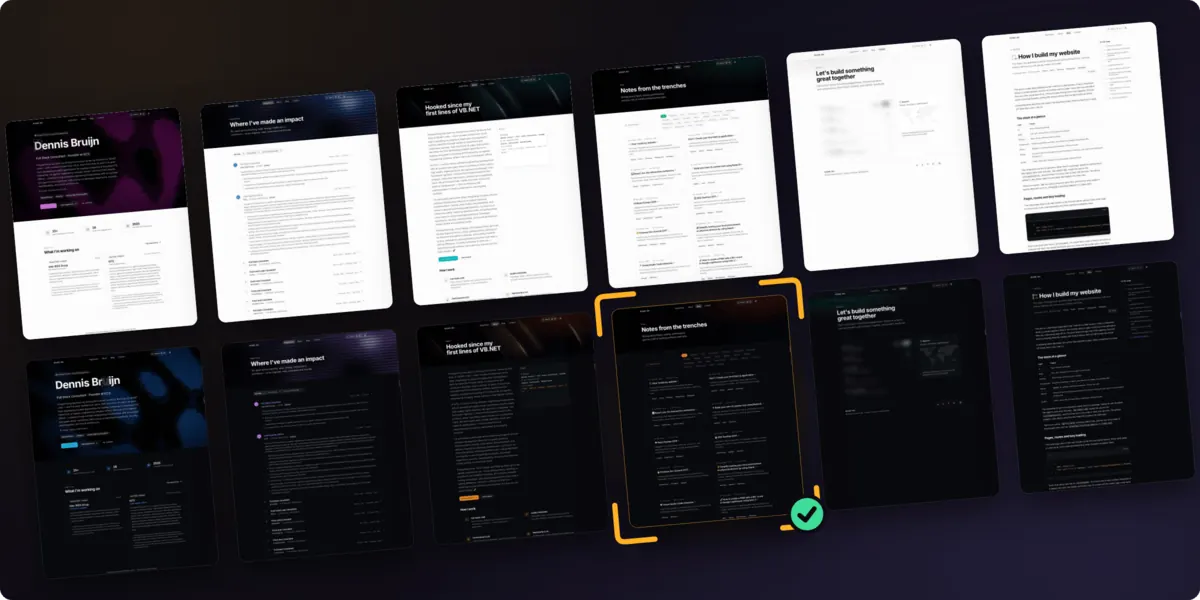
Real output from a run against www.0x1ad2.dev, with contact details blurred.
You know the ritual. A redesign is nearly done, someone asks "did you check it in dark mode?", and you open every page, flip the theme, scroll to the bottom so the lazy images show up, take a screenshot, flip the theme back, and do it all again for the next page. Then you realize you forgot the 404 page. And the blog is a pile of posts that all use the same template, so which one do you even pick?
I got tired of that ritual, so I wrote a command that does it for me:
fetch-screenshots shoot --url example.com
No config, no setup for a first run. It finds the pages, captures each one in every color scheme you ask for, and drops them in a folder with a manifest.json that says what it saw. Here's the 31-second version, made with Montage, my shared Remotion studio:
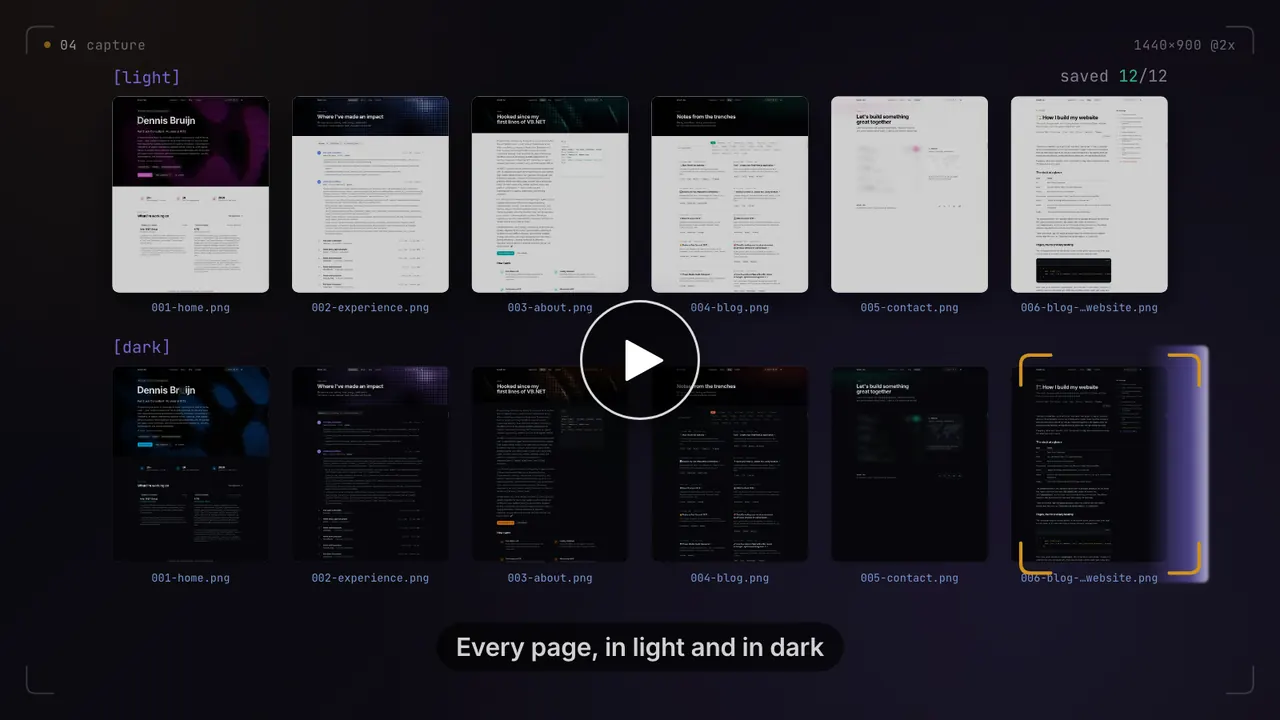
It finds every page, so you don't have to list them
You give it a site. It starts from your routes (just / by default), then goes looking for the rest:
- Links. Every link that stays on the same site joins the queue, up to 3 hops away and 100 pages in total by default.
www.example.comandexample.comcount as the same site. - Sitemaps. It reads the
Sitemap:lines inrobots.txt(or falls back to/sitemap.xml), follows sitemap indexes, and queues every page it finds there. - Everything else stays out. Links to other hosts and to files such as
.pdf,.pngor.jsare dropped.
Not sure what it'll pick up? Ask first. --dry-run crawls the site and lists the pages it would capture without saving a single PNG:
fetch-screenshots shoot 0x1ad2 --dry-run
A real run, without the dry run, looks like this:
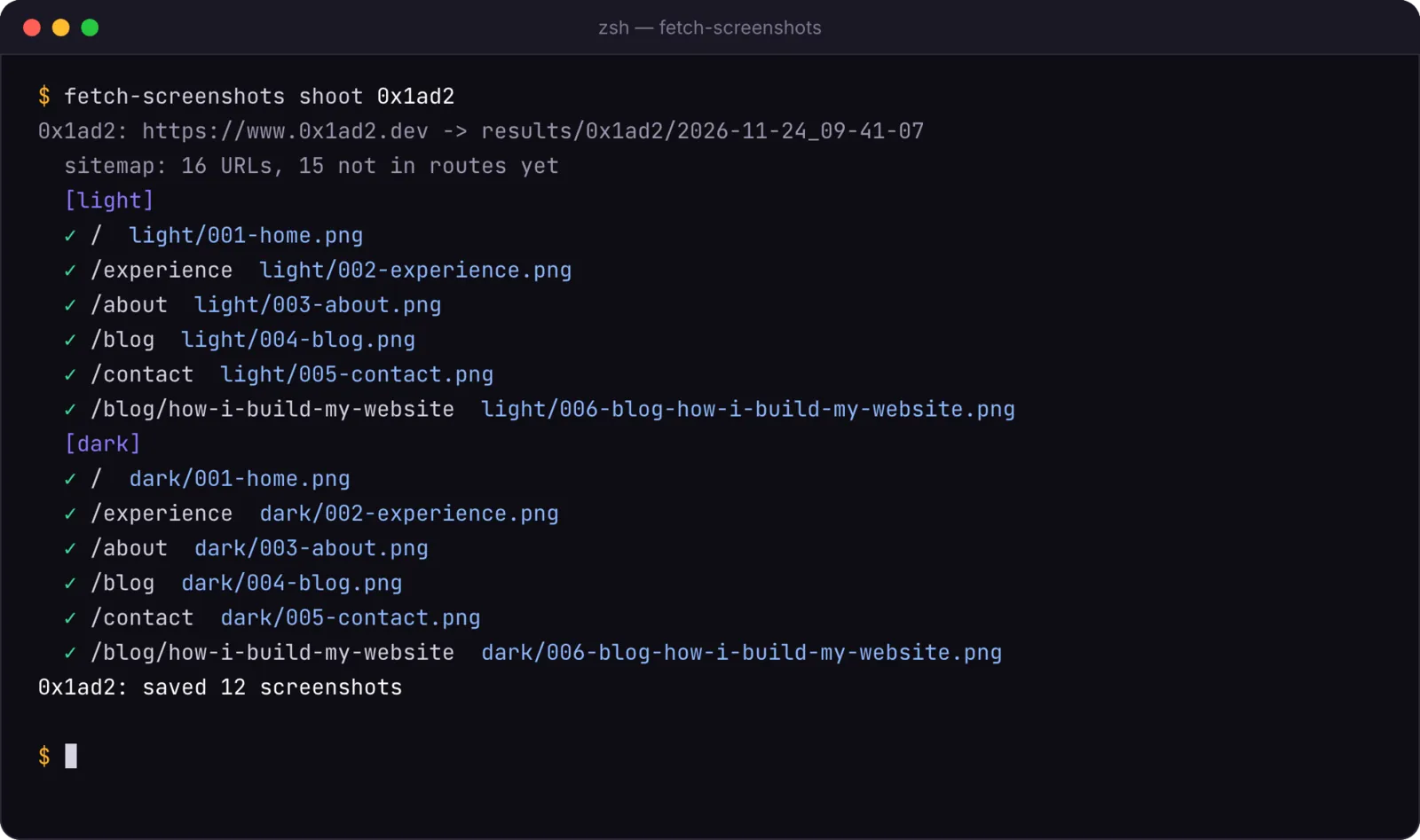
A terminal mockup made with Montage that reproduces the CLI's real print format.
One line per page: a tick, the route (with -> and the final route after a redirect) and the file it saved. The light pass finds the pages, and the dark pass captures the same list again. If any page fails, the command exits with status 1, so it slots into a script without drama.
A pile of blog posts, one screenshot
This is the part I'm proudest of. A site with a blog, a changelog or a list of runs has dozens of pages that are really the same page with different data. Screenshotting all of them is a waste of disk and of your attention.
So fetch-screenshots collapses them. /runs/974, /runs/973 and the rest count as one detail type and get 1 screenshot. Numbers, commit SHAs, UUIDs and long IDs in a path are detected on their own, and anything matching a glob you list in detail_patterns (say /blog/*) counts too. When the sitemap has dates, the newest page is the one kept, and skipped detail pages don't count toward max_pages.
Play with it. This is a small JavaScript sketch of the collapse rule and the file naming from the README, not the tool itself (that's Python and lives in shooter.py). Edit the routes or the patterns and watch the run folder change:
<style>
:root { color-scheme: dark; --amber: #ffb224; --violet: #8b7bff; --mint: #3ddc97; --dim: #8a8a99; }
* { box-sizing: border-box; }
body { margin: 0; padding: 16px; background: #0b0b10; color: #e8e8f0; font: 13px/1.5 ui-monospace, SFMono-Regular, Menlo, monospace; }
.grid { display: grid; grid-template-columns: 1fr 1fr; gap: 12px; }
@media (max-width: 560px) { .grid { grid-template-columns: 1fr; } }
label { display: block; color: var(--dim); font-size: 11px; text-transform: uppercase; letter-spacing: .08em; margin: 0 0 4px; }
textarea, input { width: 100%; background: #14141c; color: inherit; border: 1px solid #2a2a36; border-radius: 8px; padding: 8px; font: inherit; }
textarea { height: 188px; resize: vertical; }
.row { display: flex; gap: 8px; margin-top: 8px; }
.row > div { flex: 1; }
pre { margin: 0; background: #14141c; border: 1px solid #2a2a36; border-radius: 8px; padding: 8px; min-height: 248px; white-space: pre-wrap; }
.ok { color: var(--mint); } .skip { color: var(--dim); text-decoration: line-through; }
.pat { color: var(--amber); } .dark { color: var(--violet); } .sum { color: var(--amber); }
</style>
<div class="grid">
<div>
<label for="routes">Queue, in crawl order</label>
<textarea id="routes">/
/experience
/blog
/blog/how-i-build-my-website
/blog/fingerprint-end-to-end-encryption
/blog/gdg-devfest-2017
/runs/974
/runs/973
/commits/3f9a2c1
/about</textarea>
<div class="row">
<div><label for="pats">detail_patterns</label><input id="pats" value="/blog/*"></div>
<div><label for="per">max_per_pattern</label><input id="per" type="number" min="1" value="1"></div>
</div>
</div>
<div>
<label>Run folder</label>
<pre id="out"></pre>
</div>
</div>
<script>
// The ID rule from shooter.py: numbers, UUIDs, hex SHAs of 7+ chars, long mixed IDs.
const ID = /^(?:\d+|[0-9a-f]{8}-[0-9a-f]{4}-[0-9a-f]{4}-[0-9a-f]{4}-[0-9a-f]{12}|(?=[0-9a-f]*\d)[0-9a-f]{7,}|(?=\w*\d)(?=\w*[a-z])\w{16,})$/i;
const glob = (p) => new RegExp("^" + p.replace(/[.+^${}()|[\]\\]/g, "\\$&").replace(/\*/g, ".*").replace(/\?/g, ".") + "$");
const esc = (s) => s.replace(/[&<>]/g, (c) => ({ "&": "&", "<": "<", ">": ">" })[c]);
function detailPattern(route, patterns) {
const path = route.split("?")[0];
for (const p of patterns) if (glob(p).test(path)) return p;
const segs = path.split("/");
if (segs.some((s) => ID.test(s))) return segs.map((s) => (ID.test(s) ? ":id" : s)).join("/");
return null;
}
const slug = (r) => r.replace(/^\/+|\/+$/g, "").replace(/[^A-Za-z0-9._-]+/g, "-").replace(/^-+|-+$/g, "").slice(0, 120) || "home";
function run() {
const routes = document.getElementById("routes").value.split("\n").map((s) => s.trim()).filter(Boolean);
const patterns = document.getElementById("pats").value.split(",").map((s) => s.trim()).filter(Boolean);
const per = Math.max(1, parseInt(document.getElementById("per").value, 10) || 1);
const width = Math.max(2, String(100).length); // max_pages = 100, so 3 digits
const seen = {}, files = [], lines = [];
for (const route of routes) {
const p = detailPattern(route, patterns);
if (p && (seen[p] || 0) >= per) { lines.push(`<span class="skip">${esc(route)}</span> <span class="pat">${esc(p)}</span> is full`); continue; }
if (p) seen[p] = (seen[p] || 0) + 1;
const file = `${String(files.length + 1).padStart(width, "0")}-${slug(route)}.png`;
files.push(file);
lines.push(`<span class="ok">✓</span> ${esc(route)} light/${esc(file)}`);
}
files.forEach((f) => lines.push(`<span class="ok">✓</span> <span class="dark">dark/${esc(f)}</span>`));
lines.push(`<span class="sum">saved ${files.length * 2} screenshots</span>`);
document.getElementById("out").innerHTML = lines.join("\n");
}
document.querySelectorAll("textarea, input").forEach((el) => el.addEventListener("input", run));
run();
</script>
Notice /blog itself survives (it doesn't match /blog/*), /runs/974 becomes the /runs/:id type, and 3f9a2c1 gets caught as a commit SHA without any pattern at all. In the real thing the queue order comes from your routes, then the sitemaps (dated pages newest first), then the links it finds, which is why the newest post is the one you keep.
Light and dark, lined up
Every page is captured once per color scheme you list: light, dark or no-preference. Each scheme gets its own folder with the same numbered file names, so light/004-blog.png and dark/004-blog.png are always the same page. Flip between the two folders and the differences jump out.
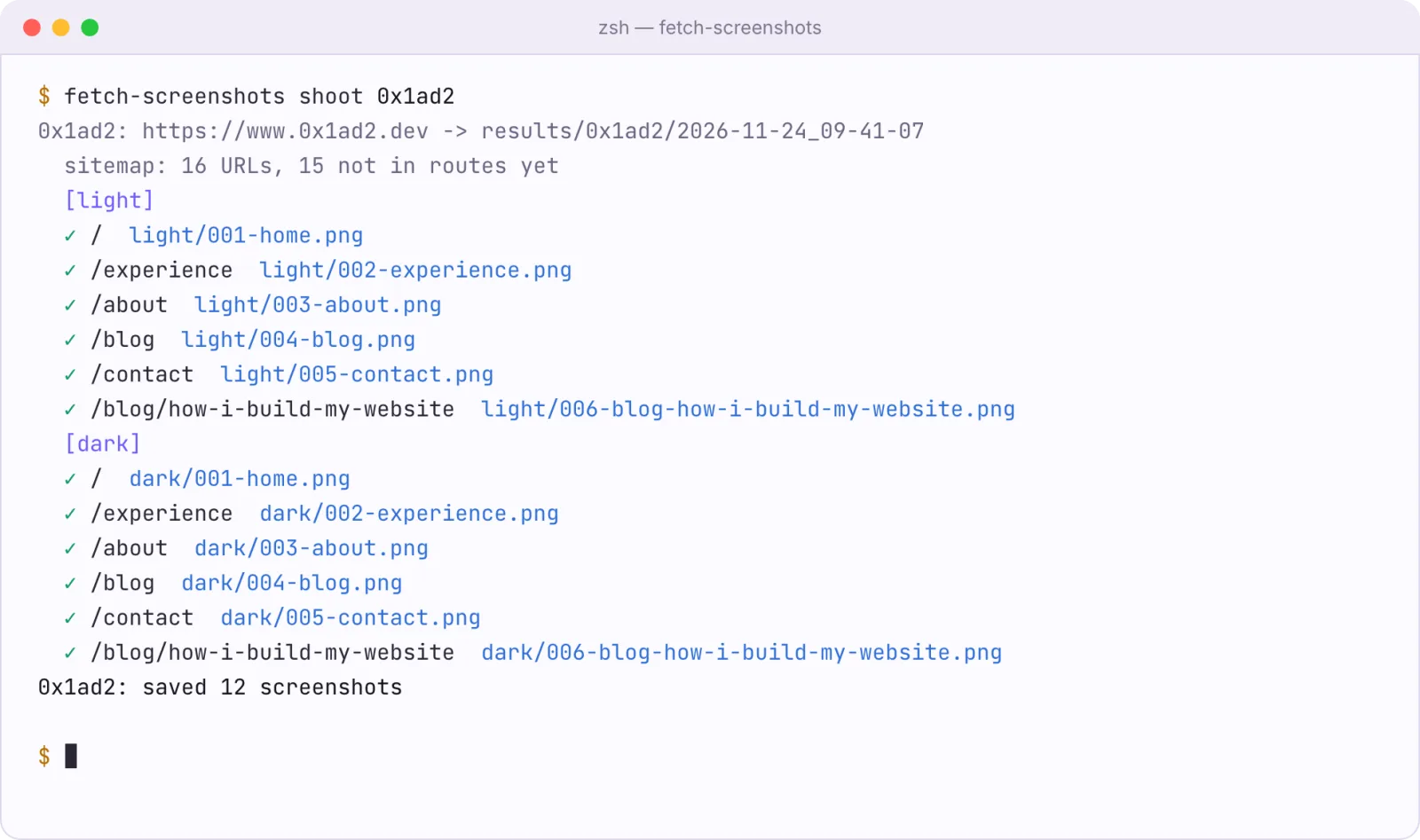
The terminal mockup from above, in light mode.
Some sites ignore the system theme and keep their own setting in localStorage. For those, local_storage writes a value before every page loads, with {scheme} swapped for the scheme being captured:
[sites.crow-control]
base_url = "http://127.0.0.1:5190"
color_schemes = ["light", "dark"]
local_storage = { "crow.control.preferences" = '{"theme":"{scheme}"}' }
The run folder looks like this, one timestamped folder per run:
results/
└── 0x1ad2/
    └── 2026-11-24_21-30-00/
        ├── light/
        │   ├── 001-home.png
        │   ├── 002-experience.png
        │   └── …
        ├── dark/
        │   └── … (the same files, in dark mode)
        └── manifest.json
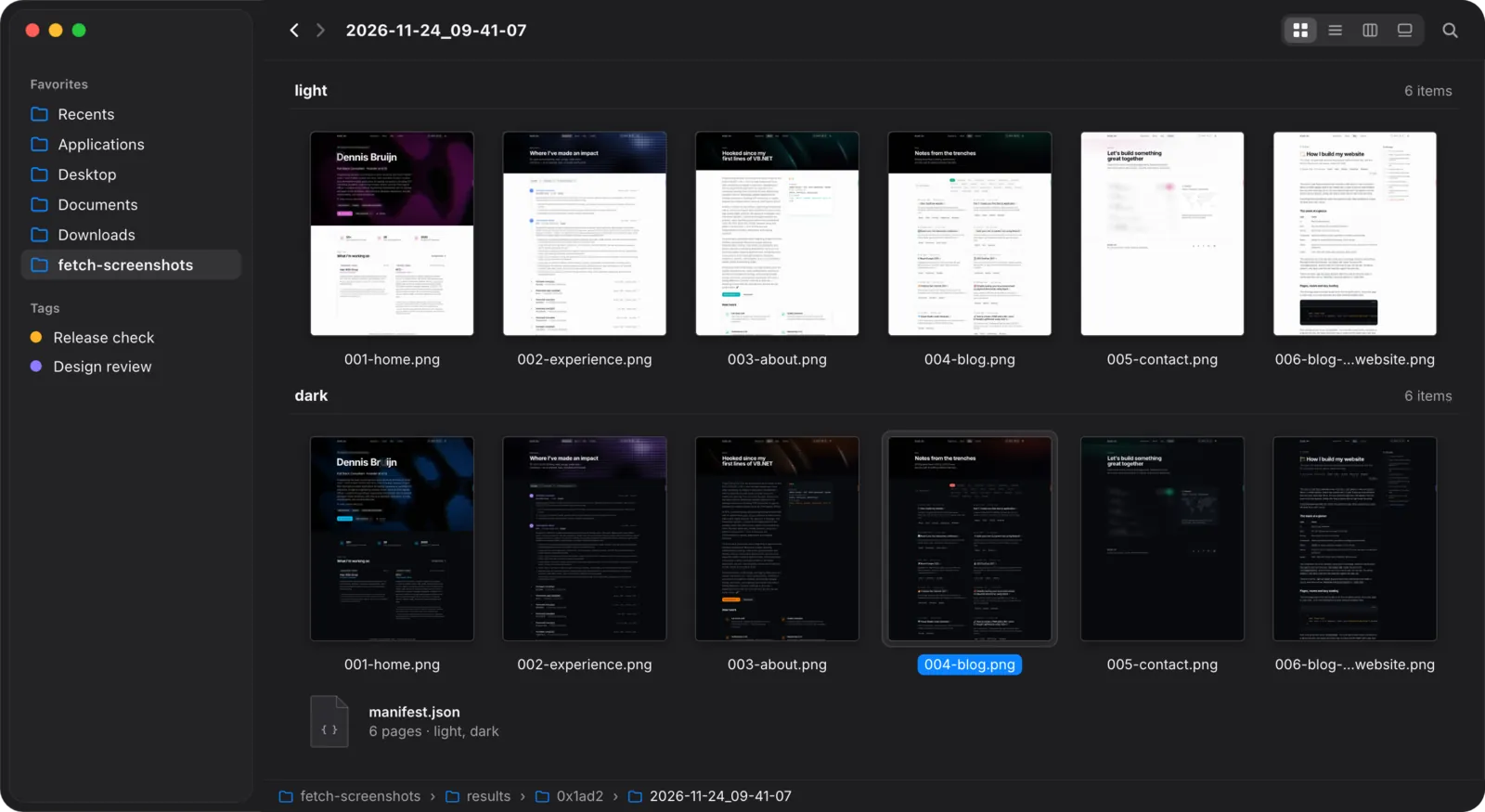
A Finder mockup made with Montage.
The contents of results/ are in .gitignore, so screenshots never end up in a commit by accident. And the manifest lists every page visited, including the ones that redirected to a page it already had:
{
  "site": "0x1ad2",
  "base_url": "https://www.0x1ad2.dev",
  "captured_at": "2026-11-24T21:30:00",
  "color_schemes": ["light", "dark"],
  "pages": [
    {
      "route": "/",
      "url": "https://www.0x1ad2.dev/",
      "title": "…",
      "file": "001-home.png",
      "duplicate_of": null,
      "error": null
    }
  ]
}
Pages that fight back
Not every page wants to be photographed.
WebGL and scroll-driven pages. If a page draws into a fixed canvas, a full-page capture comes out blank. My own home page is one of them. With capture = "scroll" the tool shoots one screen at a time (up to 60 frames) and stitches them together with Pillow into one tall PNG under the usual file name.
Full-page capture versus scroll and stitch, rendered with Montage from real captures.
[sites.kite-interactive]
base_url = "https://www.kite-interactive.online"
capture = "scroll"
frame_ms = 1200
Lazy-loaded images. scroll = true scrolls to the bottom and back before a full-page capture, so lazy images and scroll-in animations are actually on the page. CSS animations are switched off while it captures.
Pages behind a login. Set a storage_state file for the site and run:
fetch-screenshots login dashboard
A real browser window opens. You log in once, press Enter in the terminal, and later runs reuse that session until it expires. That file holds cookies and local storage, so treat it like a password; .auth/ is in .gitignore for exactly that reason.
Apps with a live event stream. Leave wait_until at "load" and raise settle_ms. The "networkidle" state never arrives on those, so every page would just sit there until it timed out. Ask me how I know.
Everything is crisp. A 1440×900 window at device scale 2 gives PNGs 2,880 pixels wide. Both are settings, if you'd rather not fill your disk.
Under the hood
It's Python 3.10+ with Playwright driving Chromium and Pillow doing the stitching, installed and run with uv, and it works on macOS, Linux and Windows. The core is three modules:
| File | What it does |
|---|---|
cli.py | The list, shoot and login commands |
config.py | sites.toml lookup, the site settings and their validation |
shooter.py | Crawl queue, sitemaps, detail collapse, capture and stitching |
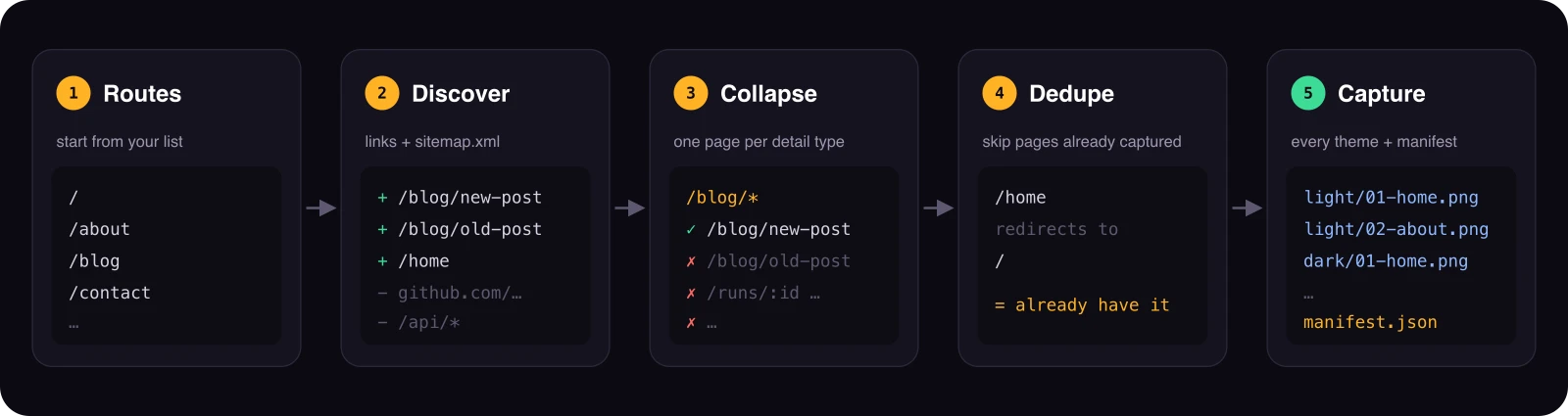
The pipeline, step by step:
- Routes. Your
routesare queued first, in order. That's how you set the order of the screenshots and include pages nothing links to. - Discover. Sitemap URLs join the queue after the routes (undated pages in sitemap order, then dated pages newest first), followed by the same-site links each page turns up.
- Collapse. Detail pages are capped at
max_per_patterneach. - Dedupe. A URL that redirects to a page it already captured is recorded as a duplicate, not saved again. Query strings are ignored unless
keep_query = true. - Capture. In the first color scheme each page is loaded, given
settle_msto settle, searched for links and captured. Every other scheme then gets a fresh browser context that captures the same list, without crawling again.
Sites you capture often get a profile in sites.toml. Settings under [defaults] apply to every site, a site's own settings win, and an unknown setting is an error rather than a silent typo. Here's the profile I use for this site:
[sites.0x1ad2]
base_url = "https://www.0x1ad2.dev"
color_schemes = ["light", "dark"]
detail_patterns = ["/blog/*"]
scroll = true
The exit status tells your scripts what happened: 0 when every page was captured, 1 when any page failed, 2 for a config error and 130 when you press ⌃C.
The tests live in tests/test_routes.py: 12 test functions, two of them parametrized, covering URL normalization and the www rule, ID and glob detection of detail pages, file name slugs, site validation, sitemap indexes with newest-first ordering and frame stitching. The sitemap test uses a fake request object, so the suite needs no browser and no network.
uv run --with pytest pytest
On privacy: it only loads the sites you name, plus their robots.txt and sitemaps, and the crawler never follows a link to another host. (The browser does load whatever a page loads itself, such as fonts, scripts and analytics, as any visitor's browser would.) Screenshots and the manifest are written to your disk and nowhere else. There's no telemetry and no account. One thing to keep in mind: it reads only the Sitemap: lines of robots.txt, not the Disallow rules, so point it only at sites you're allowed to capture.
What's not there yet
It's in development (the README says 1.0.0, but there's no tagged release yet), and the roadmap is honest about the gaps:
- A
--versionflag that prints the installed version. - Compare two runs of the same site and flag the pages that changed. There's no diffing today.
- Capture pages in parallel tabs to shorten long runs.
- Firefox and WebKit as alternatives to Chromium.
There are also no end-to-end tests that launch Chromium yet; the unit tests stop at the browser's edge.
Getting access

The source is private, so you build it from source once you have access. With Python 3.10 or later, uv and Playwright's Chromium, it's four commands:
git clone https://github.com/0x1ad2/fetch-screenshots && cd fetch-screenshots
uv tool install --editable . --with-executables-from playwright
playwright install chromium
fetch-screenshots shoot --url example.com
The install is editable, so changes to sites.toml and the source apply on the next run.
It sits next to the other things I've built on the projects page.
Curious about the source? It's private, but access can be granted to anyone interested in contributing. Get in touch.