🏠 Homey: home control with no cloud in the way
Homey for Mac scans your LAN and draws the network as an interactive map. Your iPhone or iPad then takes over and controls WiZ lights and Denon or Marantz receivers directly, with rooms, scenes and automations, and no cloud service in between.
By Dennis Bruijn · · 11 min read · #projects #apple #swift #swiftui #networking #local-first
Here's the thing that bugged me: the lamp is ten feet away, on the same Wi-Fi as the phone in your hand, and the usual way to turn it on is a round trip through somebody else's server. Homey skips the detour. No account, no cloud, no analytics. The Mac does the heavy scanning, the phone does the everyday controlling, and every packet stays on your own network.
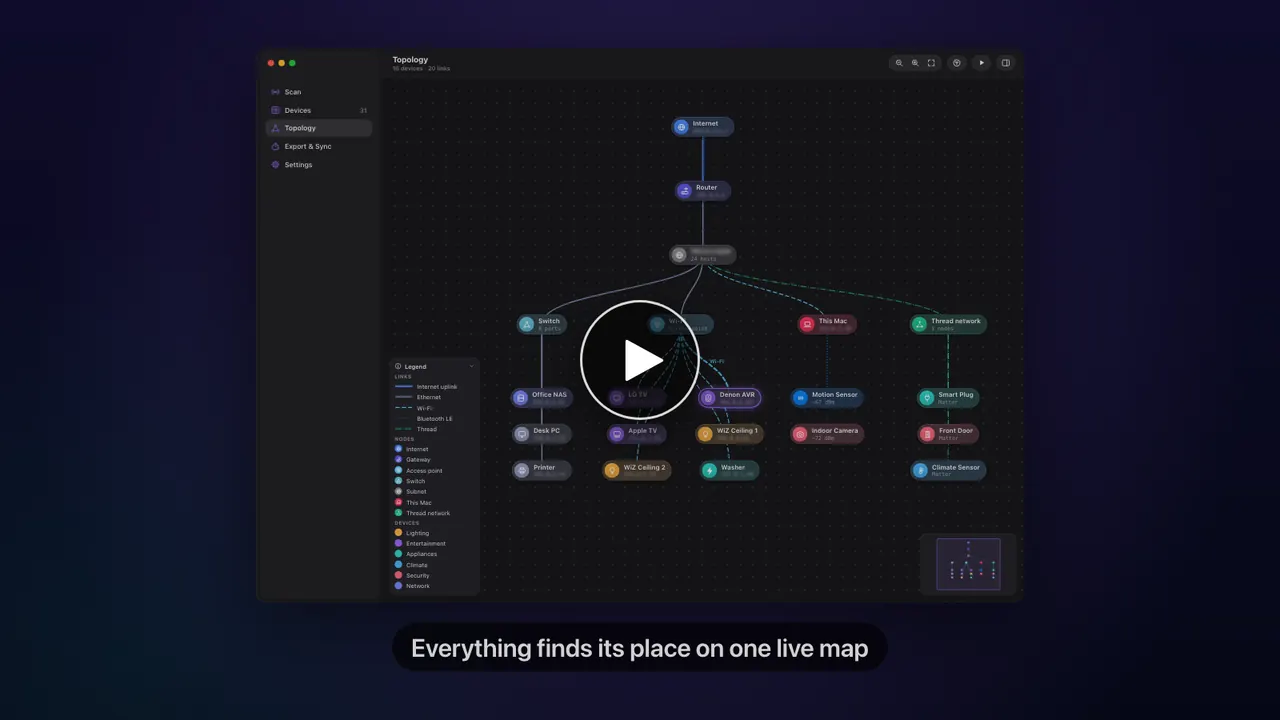
The explainer, rebuilt from Homey's SwiftUI source with synthetic data. Click to play.
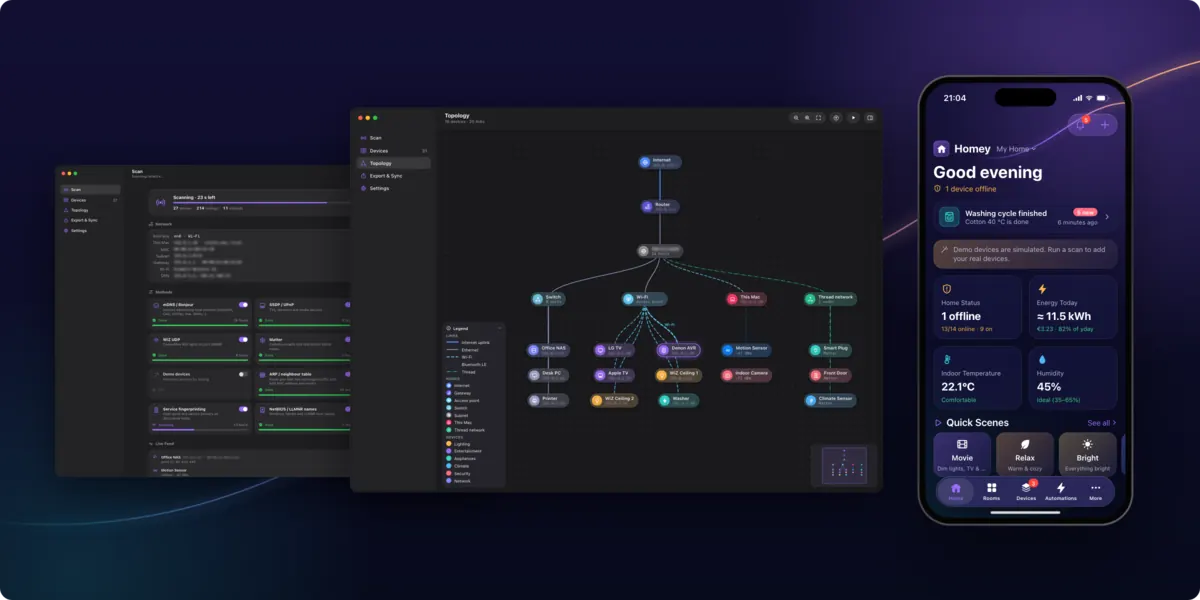
Eleven ways to find a lightbulb
Homey for Mac runs 11 discovery methods in parallel, from Bonjour and SSDP to an ICMP sweep, the ARP table, NetBIOS names and a 38-port service fingerprint. Each method sees a different slice of the house, so asking all of them at once is how you catch the quiet devices too.
| Method | What it catches | Runs on |
|---|---|---|
| mDNS / Bonjour | HomeKit, Google Cast, AirPlay, Hue, Shelly, ESPHome, Sonos, HEOS, printers, Home Assistant, MQTT… | iOS · Mac |
| SSDP / UPnP | TVs, receivers, Sonos, Hue bridges, routers | iOS · Mac |
| LAN sweep | Hosts on the subnet, via TCP probes on 80 and 443 | iOS · Mac |
| WiZ UDP | WiZ bulbs and plugs, with MAC, module, firmware and light state | iOS · Mac |
| Matter | Matter nodes, commissioners and Thread border routers | iOS · Mac |
| Bluetooth LE | Nearby sensors and accessories, with live RSSI | iOS · Mac |
| ARP / neighbour table | Every host the Mac has talked to, with MAC and OUI vendor | Mac |
| ICMP / TCP sweep | Silent hosts that advertise nothing | Mac |
| Service fingerprinting | Open ports and banners across 38 curated ports, plus a device class | Mac |
| NetBIOS / LLMNR names | Windows, Samba, NAS and Linux host names | Mac |
| Gateway & routes | Router, default route, DNS servers and Wi-Fi association | Mac |
Why does the Mac get the long list? Because iOS doesn't allow the rest. Reading the kernel ARP table through sysctl, sweeping a subnet with ICMP and fingerprinting ports are Mac-only moves, and Homey for Mac registers those deeper scanners on top of the shared discovery core. iPhone and iPad run the six methods iOS allows (plus the built-in demo devices), so they're never helpless on their own.
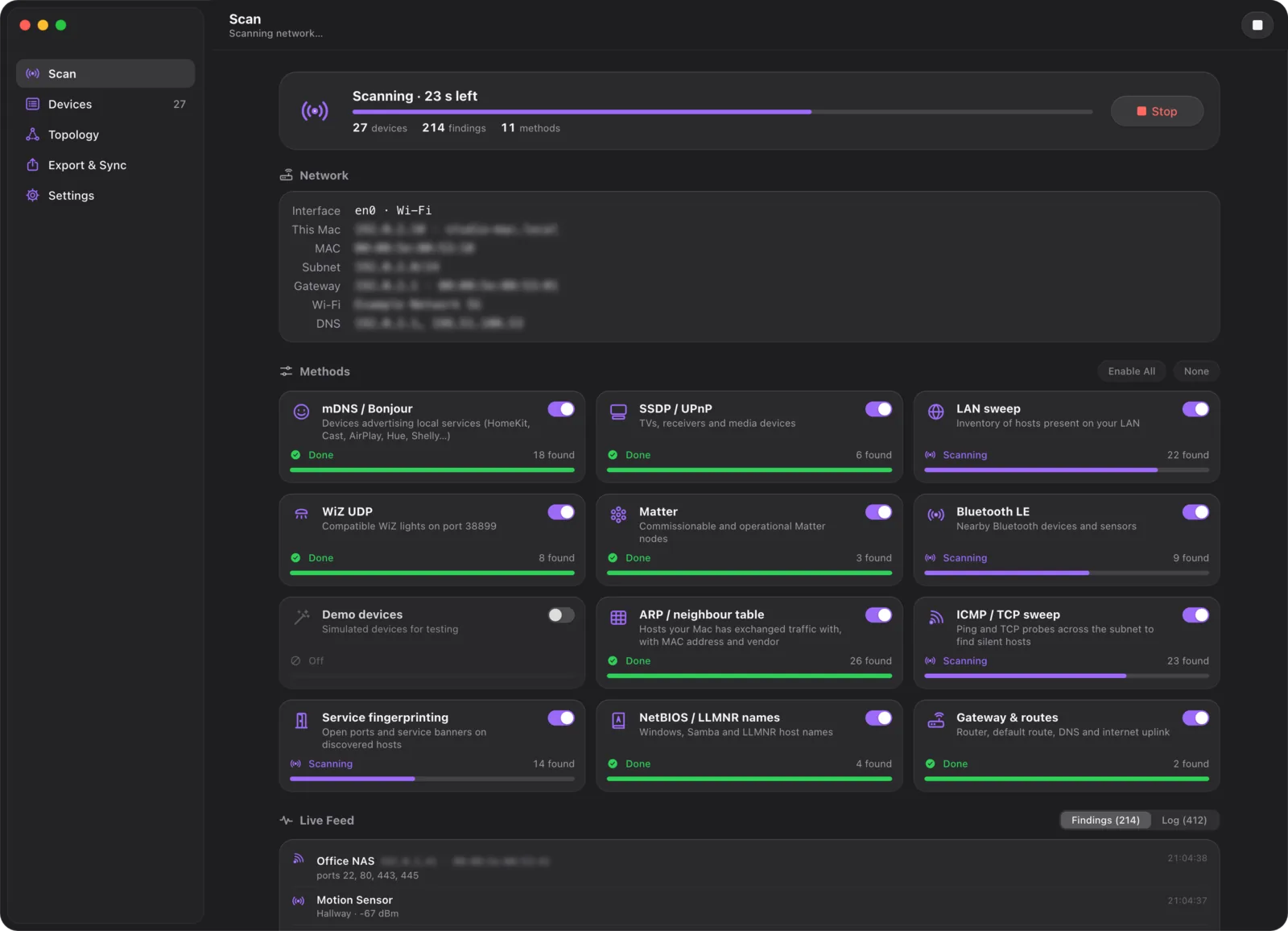
Rebuilt from Homey for Mac's SwiftUI views with a synthetic network, not a capture. Identifiers are blurred.
One device, many witnesses
Eleven scanners means the same receiver can turn up four times: Bonjour knows its IP, SSDP knows its model, ARP knows its MAC, the port scan knows it answers on 8080. Homey merges findings by identity, strongest first: MAC address → IPv4 address → Bluetooth peripheral identifier. When a later finding adds a key, for example ARP attaching a MAC to a Bonjour device that only had an IP, the records that now share a key are coalesced. One physical device, one row, all the evidence.
Step through a toy version of that rule below. Same key order; much less code than the real DeviceMerger.
<style>
  body { margin: 0; padding: 16px; background: #000; color: #eee; font: 13px/1.4 system-ui, sans-serif; }
  button { background: #9D6AF9; color: #000; border: 0; border-radius: 999px; padding: 6px 14px; font-weight: 600; cursor: pointer; margin-right: 6px; }
  button.ghost { background: #222; color: #eee; }
  #next { color: #aaa; margin: 10px 0; font-family: ui-monospace, monospace; }
  .grid { display: grid; grid-template-columns: repeat(auto-fill, minmax(190px, 1fr)); gap: 10px; }
  .card { border: 1px solid #333; border-radius: 12px; padding: 10px; }
  .card.hit { border-color: #9D6AF9; box-shadow: 0 0 0 1px #9D6AF9; }
  .k { color: #888; } .m { display: inline-block; background: #1b1430; color: #c9b3ff; border-radius: 6px; padding: 1px 6px; margin: 2px 2px 0 0; font-size: 11px; }
</style>
<button id="step">Next finding</button><button id="reset" class="ghost">Reset</button>
<div id="next"></div>
<div class="grid" id="out"></div>
<script>
const findings = [
  { method: "Bonjour", ip: "192.0.2.24", name: "Living Room AVR" },
  { method: "SSDP", ip: "192.0.2.24", name: "Denon AVR-X3800H" },
  { method: "WiZ UDP", ip: "192.0.2.31", mac: "02:00:5e:00:00:31", name: "Desk lamp" },
  { method: "Bluetooth LE", ble: "7F3A-21C0", name: "Climate sensor" },
  { method: "ARP", ip: "192.0.2.24", mac: "02:00:5e:00:00:24" },
  { method: "Ports", ip: "192.0.2.24", name: "Denon (HTTP 8080)" },
  { method: "ICMP sweep", ip: "192.0.2.31" },
];
let devices = [], i = 0, lastHit = null;
// Strongest key first: MAC, then IPv4 (unless the MACs disagree), then the BLE identifier.
function match(d, f) {
  if (f.mac && d.mac) return d.mac === f.mac;
  if (f.ip && d.ip === f.ip) return true;
  return !!(f.ble && d.ble === f.ble);
}
function absorb(d, f) {
  for (const k of ["ip", "mac", "ble", "name"]) if (!d[k] && f[k]) d[k] = f[k];
  d.methods = [...new Set([...(d.methods || []), ...(f.methods || [f.method])])];
  return d;
}
function step() {
  if (i >= findings.length) return;
  const f = findings[i++];
  let d = devices.find(x => match(x, f));
  if (d) absorb(d, f); else devices.push(d = absorb({}, f));
  // Coalesce: records that now share a key become one device.
  devices = devices.filter(o => o === d || !(match(d, o) || match(o, d)) || (absorb(d, o), false));
  lastHit = d; render();
}
function render() {
  document.getElementById("next").textContent = i < findings.length
    ? "Next: " + findings[i].method + " → " + JSON.stringify(findings[i]).replace(/"method":"[^"]+",?/, "")
    : "All findings merged: " + findings.length + " findings, " + devices.length + " devices.";
  document.getElementById("out").innerHTML = devices.map(d =>
    `<div class="card ${d === lastHit ? "hit" : ""}"><b>${d.name || "Unknown host"}</b><br>
     <span class="k">ip</span> ${d.ip || "–"}<br><span class="k">mac</span> ${d.mac || "–"}<br>
     <span class="k">ble</span> ${d.ble || "–"}<br>${d.methods.map(m => `<span class="m">${m}</span>`).join("")}</div>`).join("");
}
document.getElementById("step").onclick = step;
document.getElementById("reset").onclick = () => { devices = []; i = 0; lastHit = null; render(); };
render();
</script>
Then it draws you a map
The merged list becomes an interactive topology: internet → gateway → subnet → Wi-Fi segment, access points and switches → hosts, with Bluetooth and Thread branches hanging off the side. My favorite detail is the honesty in the line styles. Links a scanner actually observed are solid; placements Homey had to guess are drawn as inferred edges. A map that tells you where it's guessing is a map you can trust.
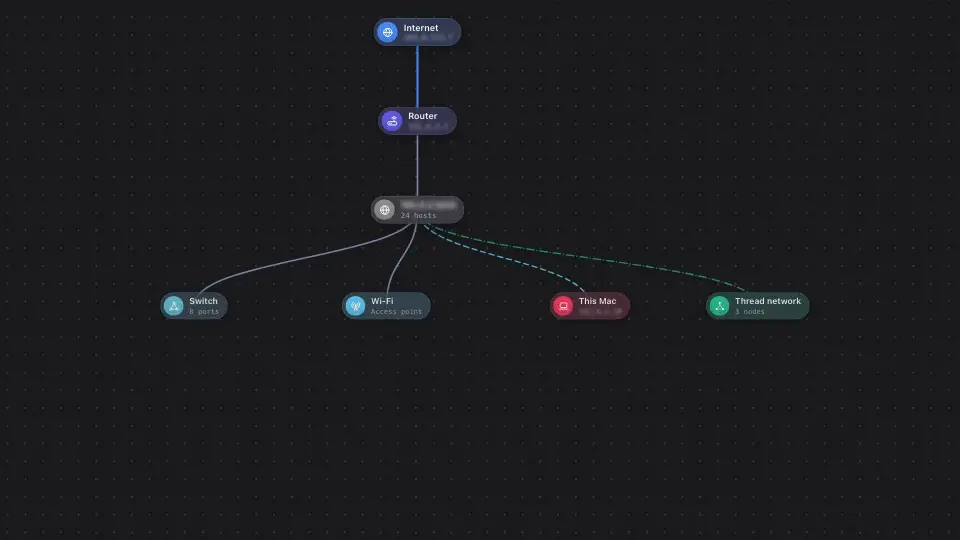
The topology map, level by level, on a synthetic network. Click for the 7-second loop.
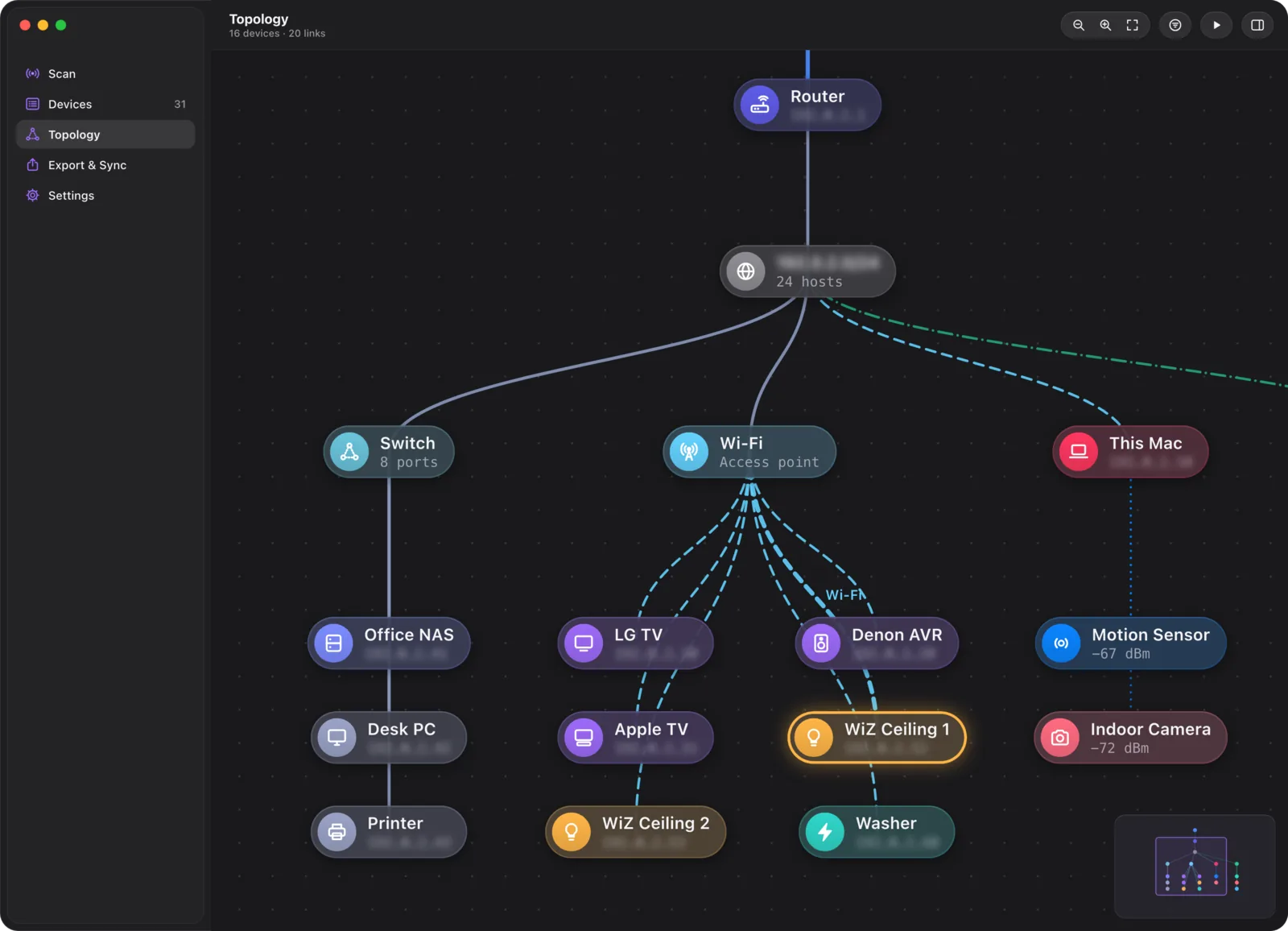
Rebuilt from Homey for Mac's SwiftUI views with a synthetic network, not a capture.
On the Mac, the Devices section turns the same scan into a sortable table, with an inspector that lists identity, roles, open ports, services and the evidence from each method.
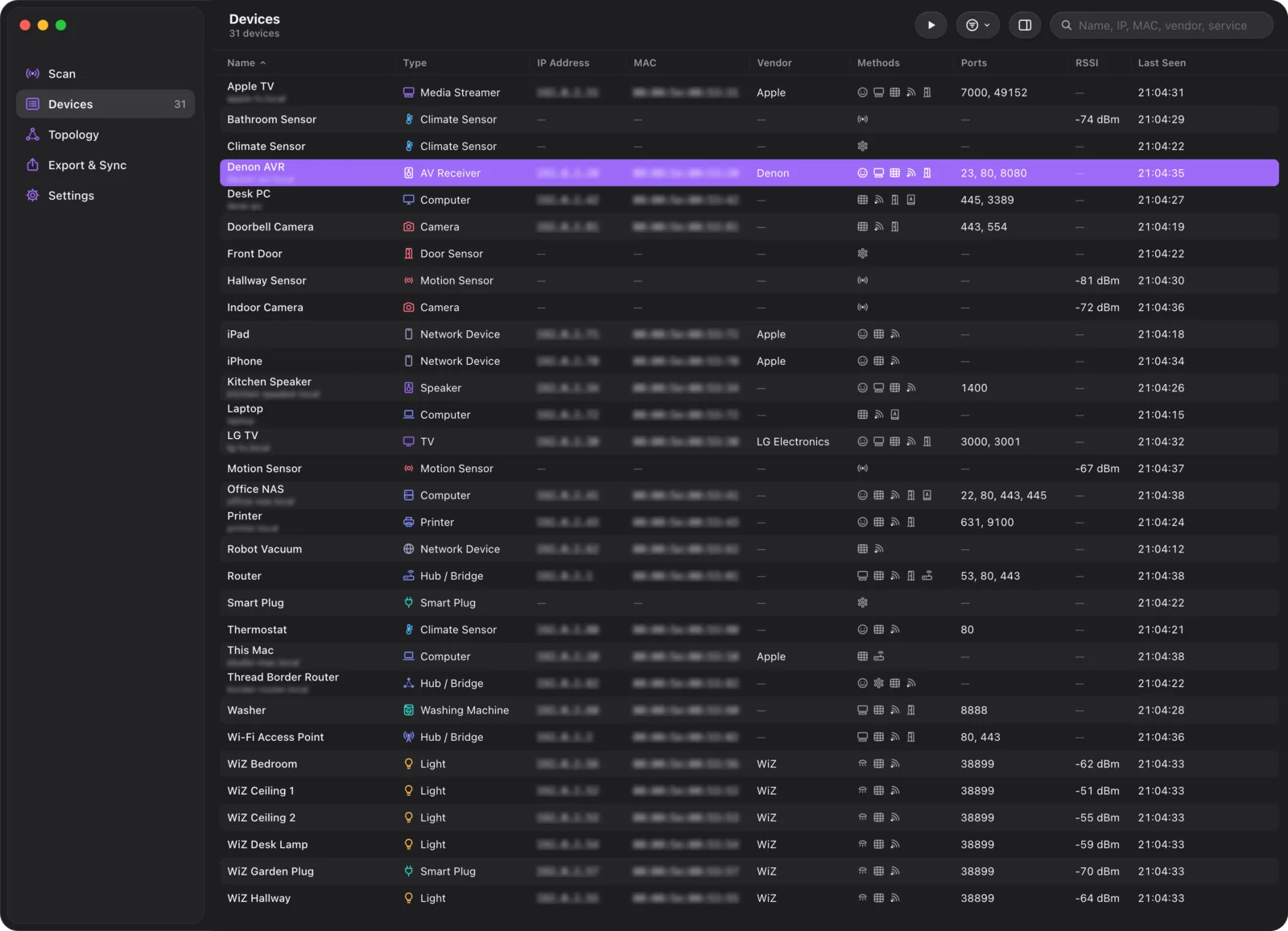
Rebuilt from Homey for Mac's SwiftUI views with a synthetic network, not a capture. Identifiers are blurred.
Handing the scan to your phone
A map on the Mac is nice. A map on the phone in your hand is the point. When you choose Share Scan (<kbd>⇧⌘E</kbd>), the Mac advertises the scan over Bonjour as _homey-sync._tcp and shows a 6-digit pairing code. On the iPhone or iPad you open the Discovery Wizard, tap Import from Mac, pick your Mac and type the code.
Two rules keep that handoff from becoming a party trick for your neighbors: the Mac only serves its snapshot to local addresses that present the current code, and the code rotates after 5 wrong attempts. You can't brute-force a million combinations five guesses at a time. Prefer files? Export a .homeyscan with <kbd>⌘E</kbd> and send it through Files or AirDrop; imported files and frames are capped at 32 MB and schema-checked.
Try guessing your way in:
<style>
  body { margin: 0; padding: 16px; background: #000; color: #eee; font: 14px/1.4 system-ui, sans-serif; display: grid; grid-template-columns: 1fr 1fr; gap: 12px; }
  .pane { border: 1px solid #333; border-radius: 14px; padding: 14px; }
  h4 { margin: 0 0 8px; font-size: 12px; letter-spacing: .12em; text-transform: uppercase; color: #9D6AF9; }
  #code { font: 600 28px ui-monospace, monospace; letter-spacing: .2em; }
  input { width: 100%; box-sizing: border-box; background: #111; color: #fff; border: 1px solid #444; border-radius: 10px; padding: 8px; font: 18px ui-monospace, monospace; letter-spacing: .2em; }
  button { margin-top: 8px; width: 100%; background: #9D6AF9; border: 0; border-radius: 999px; padding: 8px; font-weight: 600; cursor: pointer; }
  #log { grid-column: 1 / -1; color: #aaa; font: 12px ui-monospace, monospace; white-space: pre-line; }
  .dots span { display: inline-block; width: 10px; height: 10px; border-radius: 50%; background: #333; margin-right: 4px; }
  .dots span.used { background: #ff6b6b; }
</style>
<div class="pane"><h4>Homey for Mac</h4><div>Pairing code</div><div id="code"></div><div class="dots" id="dots"></div></div>
<div class="pane"><h4>iPhone</h4><input id="guess" maxlength="6" inputmode="numeric" placeholder="000000"><button id="send">Import from Mac</button></div>
<div id="log"></div>
<script>
const MAX_REJECTED = 5;
let code, wrong;
const log = t => (document.getElementById("log").textContent = t + "\n" + document.getElementById("log").textContent);
function issue() {
  code = String(Math.floor(Math.random() * 1e6)).padStart(6, "0");
  wrong = 0; draw();
}
function draw() {
  document.getElementById("code").textContent = code.slice(0, 3) + " " + code.slice(3);
  document.getElementById("dots").innerHTML = Array.from({ length: MAX_REJECTED }, (_, n) => `<span class="${n < wrong ? "used" : ""}"></span>`).join("");
}
document.getElementById("send").onclick = () => {
  const g = document.getElementById("guess").value.replace(/\D/g, "");
  if (g === code) { log("✓ Code accepted. Snapshot sent over the LAN."); issue(); return; }
  wrong++;
  if (wrong >= MAX_REJECTED) { log("✗ " + MAX_REJECTED + " wrong codes. New code issued, the old one stops working."); issue(); }
  else { log("✗ Wrong code (" + (MAX_REJECTED - wrong) + " left before it rotates). Empty frame returned."); draw(); }
};
issue();
</script>
Without a Mac, the wizard runs the iOS methods itself. Without a network at all, a labeled demo home on documentation-only addresses lets you explore every screen before you scan.
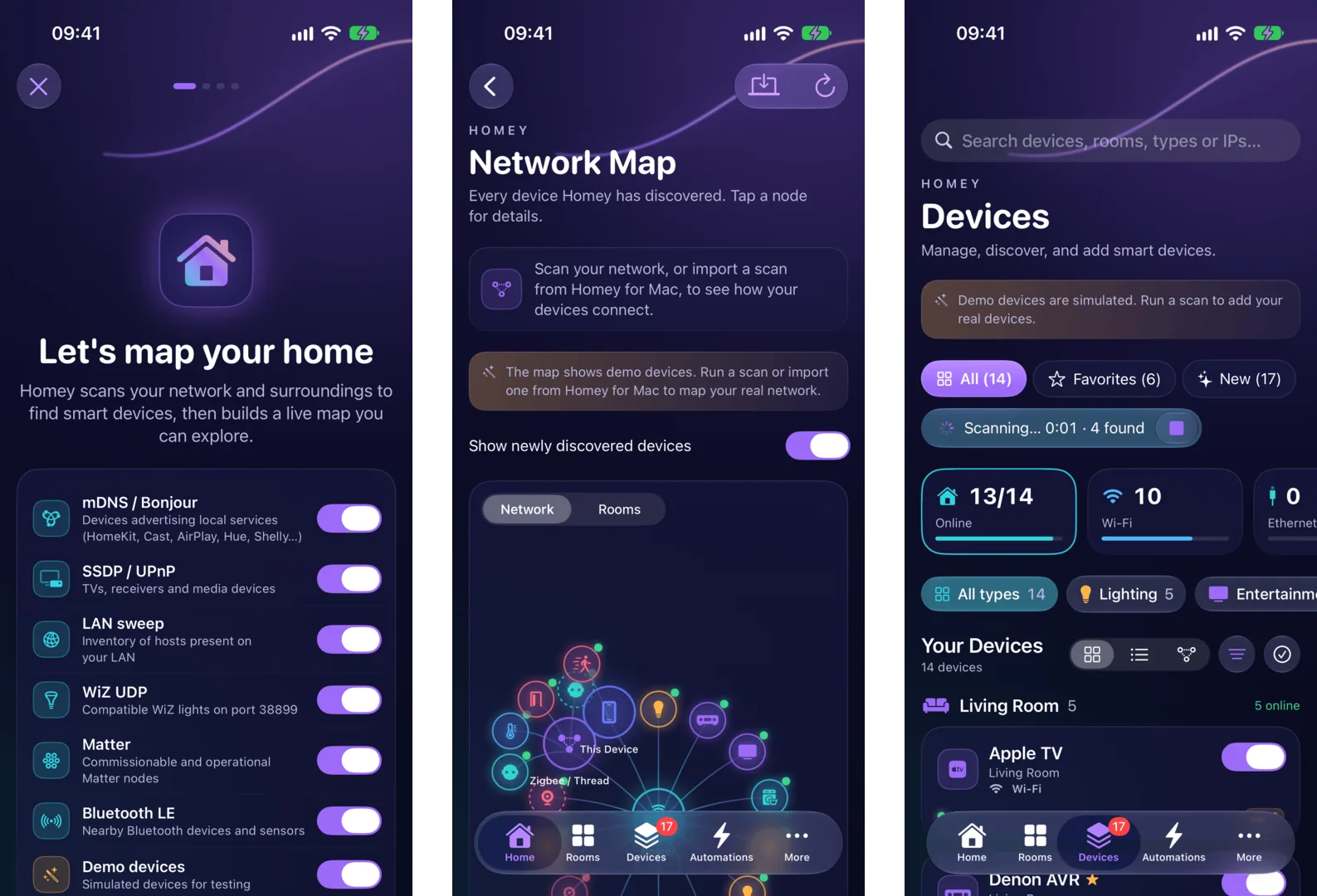
Real captures of the built-in demo home on iPhone: the Discovery Wizard, the Network Map and Devices.
Real local control, no middleman
This is where most "local" home apps quietly phone home. Homey doesn't. Two device families get real drivers:
- WiZ lights over UDP 38899, using
setPilotandgetPilotwith retries: power, brightness, a color wheel, tunable white, every built-in WiZ dynamic scene, groups and live status polling. - Denon and Marantz receivers over the HTTP interface on port 8080 (80 on older models), with a telnet fallback on port 23: zones, volume in dB, mute, inputs, sound modes and a speaker layout read from
CV?.
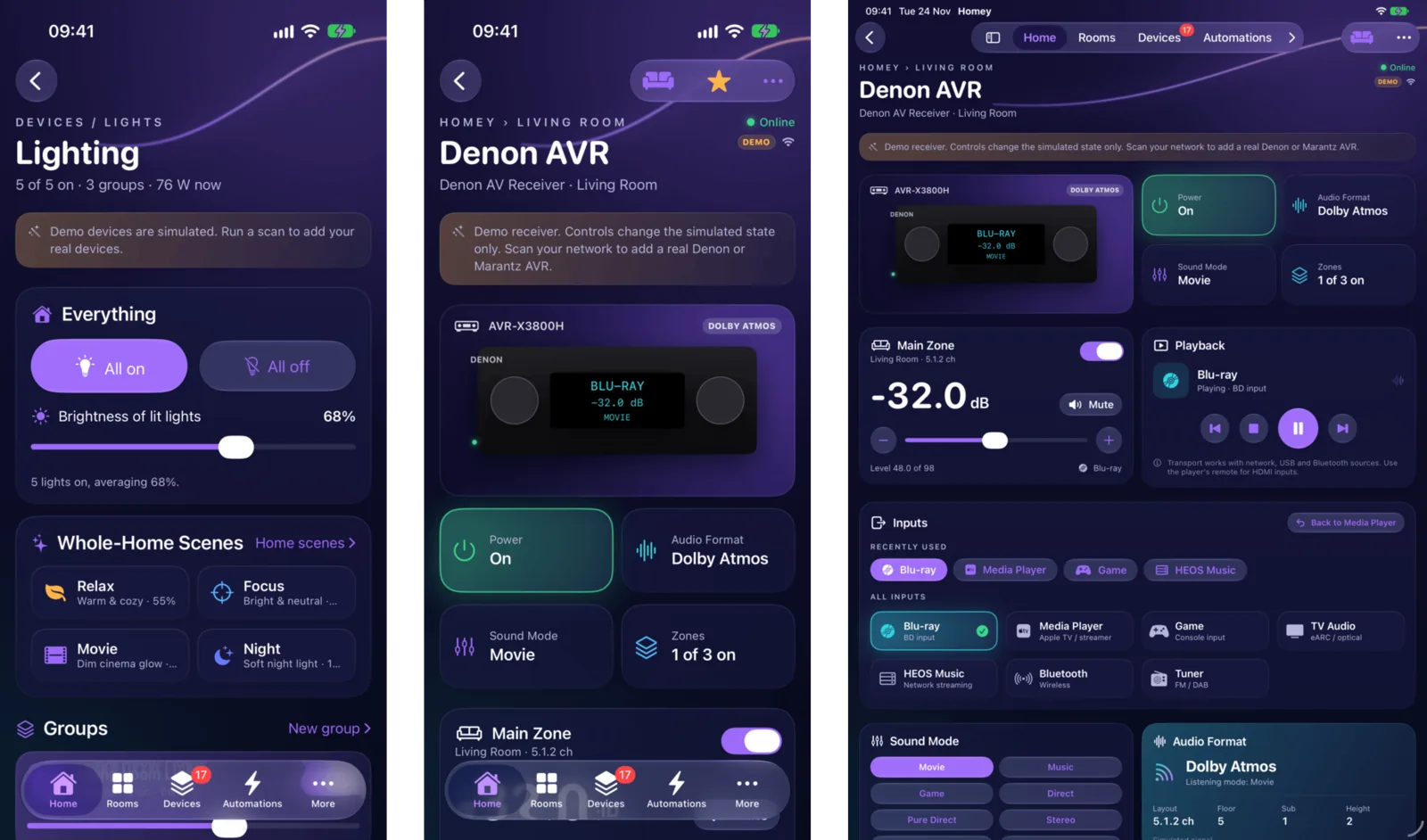
Real captures of the built-in demo home: Lighting and Denon AVR on iPhone, Denon AVR on iPad.
The WiZ protocol is refreshingly small: one JSON datagram per change. This is the function in WiZClient that builds it, trimmed of the scene branch:
static func payload(isOn: Bool, light: LightState?) -> Data {
    var params: [String: Any] = ["state": isOn]
    if isOn, let light {
        params["dimming"] = max(10, min(100, Int(light.brightness)))
        switch light.mode {
        case .white:
            params["temp"] = max(2200, min(6500, light.kelvin))
        case .color:
            var value: UInt64 = 0
            Scanner(string: light.colorHex).scanHexInt64(&value)
            let rgb = (Int(value >> 16 & 0xFF), Int(value >> 8 & 0xFF), Int(value & 0xFF))
            if rgb == (0, 0, 0) {
                // WiZ rejects an all-zero colour; fall back to the white temperature.
                params["temp"] = max(2200, min(6500, light.kelvin))
            } else {
                params["r"] = rgb.0
                params["g"] = rgb.1
                params["b"] = rgb.2
            }
        // case .scene: sends a sceneId
        }
    }
    let body: [String: Any] = ["id": 1, "method": "setPilot", "params": params]
    return (try? JSONSerialization.data(withJSONObject: body)) ?? Data()
}
And here it is again as a playground. Push the sliders past the limits and watch the clamps do their job, or pick pure black and see the fallback kick in:
<style>
  body { margin: 0; padding: 16px; background: #000; color: #eee; font: 13px/1.5 system-ui, sans-serif; display: grid; grid-template-columns: 220px 1fr; gap: 16px; }
  label { display: block; margin-bottom: 8px; color: #aaa; }
  input[type=range], select { width: 100%; accent-color: #9D6AF9; }
  select { background: #111; color: #eee; border: 1px solid #444; border-radius: 8px; padding: 4px; }
  pre { margin: 0; background: #0b0b0b; border: 1px solid #333; border-radius: 12px; padding: 12px; font: 12px/1.5 ui-monospace, monospace; color: #c9b3ff; white-space: pre-wrap; }
  .bulb { width: 56px; height: 56px; border-radius: 50%; margin: 4px 0 10px; box-shadow: 0 0 32px var(--glow, #000); background: var(--glow, #111); }
</style>
<div>
  <div class="bulb" id="bulb"></div>
  <label><input type="checkbox" id="on" checked> On</label>
  <label>Mode <select id="mode"><option>white</option><option>color</option></select></label>
  <label>Brightness <span id="bv"></span><input type="range" id="b" min="0" max="100" value="68"></label>
  <label>Kelvin <span id="kv"></span><input type="range" id="k" min="1500" max="8000" step="100" value="2700"></label>
  <label>Color <input type="color" id="c" value="#9d6af9"></label>
</div>
<pre id="out"></pre>
<script>
const $ = id => document.getElementById(id);
const clamp = (lo, hi, v) => Math.max(lo, Math.min(hi, v));
function kelvinRGB(k) { const t = (k - 2200) / 4300; return [255, Math.round(180 + 60 * t), Math.round(110 + 145 * t)]; }
function render() {
  const isOn = $("on").checked, params = { state: isOn };
  let glow = "#111";
  if (isOn) {
    params.dimming = clamp(10, 100, +$("b").value);
    const hex = parseInt($("c").value.slice(1), 16), rgb = [hex >> 16 & 255, hex >> 8 & 255, hex & 255];
    if ($("mode").value === "white" || rgb.every(v => v === 0)) {
      params.temp = clamp(2200, 6500, +$("k").value);
      glow = `rgb(${kelvinRGB(params.temp)})`;
    } else {
      [params.r, params.g, params.b] = rgb;
      glow = $("c").value;
    }
    $("bulb").style.opacity = 0.25 + 0.75 * params.dimming / 100;
  }
  if (!isOn) $("bulb").style.opacity = 0.25;
  $("bulb").style.setProperty("--glow", glow);
  $("bv").textContent = $("b").value; $("kv").textContent = $("k").value + " K";
  $("out").textContent = "UDP → 192.0.2.31:38899\n\n" + JSON.stringify({ id: 1, method: "setPilot", params }, null, 2);
}
document.querySelectorAll("input, select").forEach(el => el.addEventListener("input", render));
render();
</script>
Two safety rails sit around all of this. Commands only go to devices found on your network, never to demo devices. And Send commands to real devices in Settings › Discovery & Network is a master switch: on by default, and one tap turns off every command to real hardware at once.
A whole home, not just a remote
Once the devices are in, Homey becomes the kind of app you leave on the home screen.
- Home dashboard. Live tiles for devices online, energy today in kWh and cost, indoor temperature and humidity, plus Quick Scenes and an Active Now strip. iPad adds Dashboard, Energy and Climate pages.
- Rooms and scenes. Rooms grouped by floor with photos, climate and energy. Seven built-in scenes (Movie, Good Morning, Away, Night, Relax, Focus and Bright) set themselves up from the devices in the home or in one room.
- Automations. Triggers on time of day, sunrise or sunset with an offset, device state, washer finished and motion. Actions run a scene, change a device or send a notification, with a calendar, a day timeline and an execution log.
- Notifications. A notification center filtered by category and alert type, with a 24-hour summary, quiet hours and Open links that jump straight to the device.
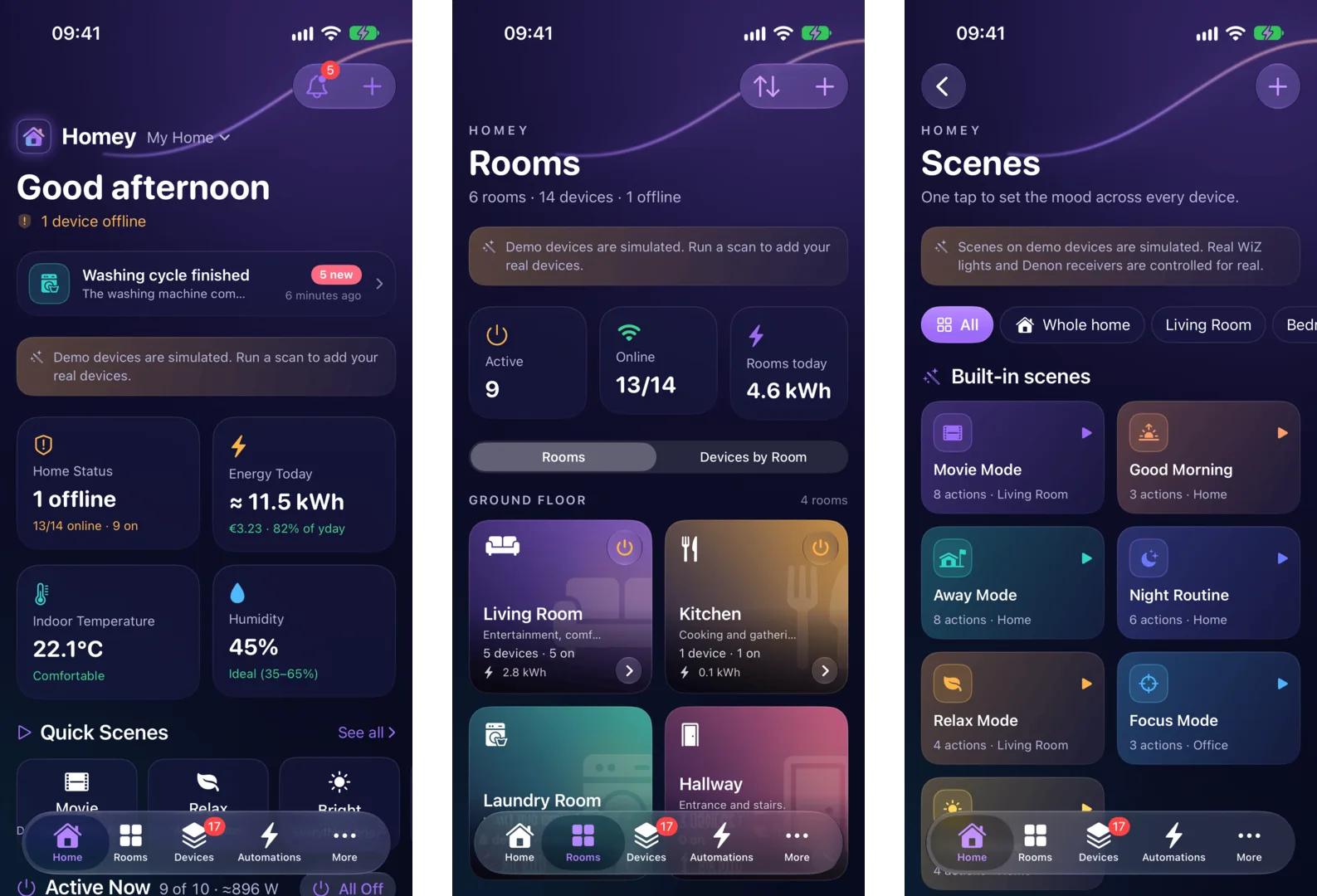
Real captures of the built-in demo home on iPhone: Home, Rooms and Scenes.
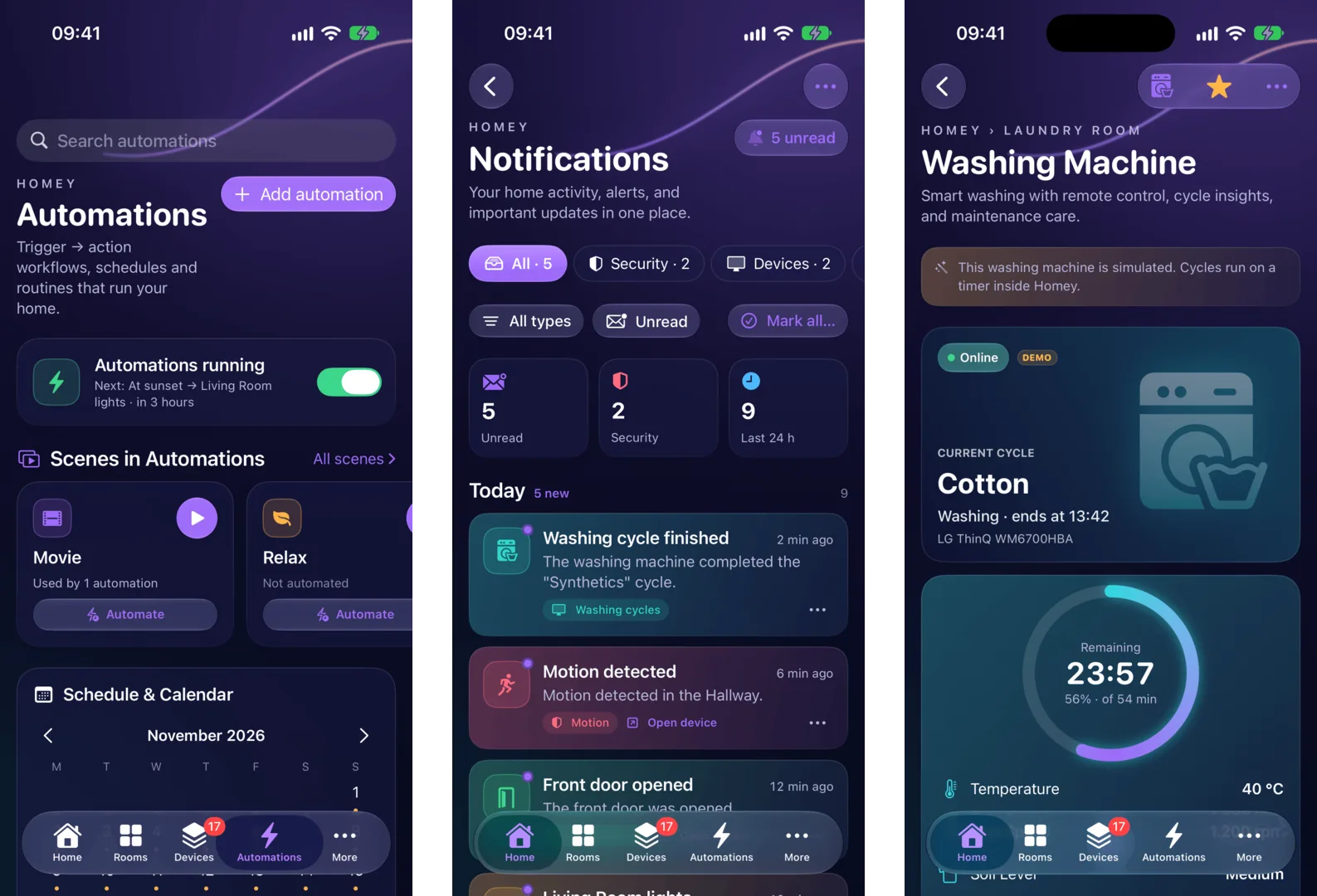
Real captures of the built-in demo home: Automations, Notifications and the Washing Machine screen.
A word on that washer, because I'd rather say it than have you find out: the washer and TV screens are full control screens with countdowns, programs and media status, but they're simulated. Homey has no local driver for them yet, and each screen says so at the top. Same goes for cameras: modeled and automatable inside Homey, but no commands reach the hardware.
Six accents, one tap
Everything is built in SwiftUI with Liquid Glass, in Auto, Light or Dark, with reduced motion and high contrast. Pick an accent in Settings › Appearance and the whole interface retints: the tab bar, chips, toggles and the glow behind each room.
Rebuilt from Homey's SwiftUI source and theme tokens with synthetic data. One tap per accent.
The trick is that the accent is one observable value every view reads, so changing it redraws the lot. Here are Homey's six accent hexes, straight from the source, driving one CSS variable:
<style>
  :root { --accent: #9D6AF9; }
  body { margin: 0; padding: 16px; background: #000; color: #eee; font: 14px system-ui, sans-serif; }
  .swatches { display: flex; gap: 8px; margin-bottom: 14px; }
  .swatches button { width: 28px; height: 28px; border-radius: 50%; border: 2px solid transparent; cursor: pointer; }
  .swatches button.on { border-color: #fff; }
  .tiles { display: grid; grid-template-columns: repeat(3, 1fr); gap: 10px; }
  .tile { border-radius: 16px; padding: 12px; background: radial-gradient(120% 90% at 0% 0%, color-mix(in srgb, var(--accent) 35%, transparent), #0d0d12 70%); border: 1px solid #222; transition: background .4s; }
  .tile b { display: block; font-size: 20px; margin-top: 6px; }
  .chip { display: inline-block; margin-top: 12px; padding: 4px 12px; border-radius: 999px; background: var(--accent); color: #000; font-weight: 600; transition: background .4s; }
  .toggle { float: right; width: 40px; height: 24px; border-radius: 999px; background: var(--accent); position: relative; transition: background .4s; }
  .toggle::after { content: ""; position: absolute; right: 3px; top: 3px; width: 18px; height: 18px; border-radius: 50%; background: #fff; }
</style>
<div class="swatches" id="sw"></div>
<div class="tiles">
  <div class="tile">Devices<b>14 online</b></div>
  <div class="tile">Lights<b>5 of 5 on</b></div>
  <div class="tile">Living Room <span class="toggle"></span><b>21.5 °C</b></div>
</div>
<span class="chip">Movie</span>
<script>
// Homey/Models/Home.swift: static let accents
const accents = ["9D6AF9", "4C8DFF", "2FD6E0", "3DD68C", "FFB547", "FF6BA8"];
const sw = document.getElementById("sw");
accents.forEach((hex, n) => {
  const b = document.createElement("button");
  b.style.background = "#" + hex; b.title = "#" + hex; if (n === 0) b.className = "on";
  b.onclick = () => {
    document.documentElement.style.setProperty("--accent", "#" + hex);
    sw.querySelectorAll("button").forEach(x => x.className = x === b ? "on" : "");
  };
  sw.appendChild(b);
});
</script>
(The tile numbers are made up for the playground. The hexes aren't.)
No cloud, on purpose
Privacy isn't a settings page in Homey; it's the architecture.
- No account, no cloud, no analytics. Homey has no server. Scans, homes and settings stay on your devices, saved in Application Support.
- Scans stay on the LAN. Reverse DNS goes only to private-address resolvers, and the gateway scanner never looks up your public IP.
- Device-supplied URLs are fenced in. SSDP
LOCATIONheaders, UPnP links and HTTP banners go throughDeviceHTTP, which only accepts plainhttporhttpsURLs pointing at the exact IP that replied, with no credentials and a valid port. Redirects must pass the same check, sessions are ephemeral and bodies are capped at 256 KB. - App Lock. Face ID, Touch ID or Optic ID with a passcode fallback. The lock screen covers every window from the first frame, and the setting fails closed if saved data is lost.
- Security actions are confirmed. With Confirm security actions on (the default), Homey asks for authentication before a camera is switched on or off from a control, a scene or Run Now.
That DeviceHTTP fence is my favorite paranoid detail. A device on your network gets to tell Homey where its description lives, and Homey politely refuses to go anywhere else.
Under the hood
Stack: Swift 6 · SwiftUI (Liquid Glass) · Network.framework and BSD sockets · CoreBluetooth · Bonjour (DNS-SD) · XcodeGen. It targets iOS, iPadOS and macOS 26.
The whole thing fits in one picture:
Scanners ──ScanFinding──▶ DiscoveryEngine ──▶ ScanSnapshot
(Bonjour, SSDP, ARP,      (DeviceMerger,      (devices, environment,
 ICMP, WiZ, Matter,        TopologyBuilder)    topology)
 BLE, ports)                                        │
                                .homeyscan or _homey-sync._tcp
                                                    ▼
                         HomeStore (iPhone and iPad) ──▶ DeviceController
                                                          ├─ UDP 38899 ──────────────▶ WiZ lights
                                                          └─ HTTP 8080/80, telnet 23 ─▶ Denon or Marantz AVR
- Shared discovery core.
Homey/Discovery(engine, merger, topology, snapshot and sync) is compiled into both targets. The Mac registers its deeper scanners throughScannerCatalog, and a registered scanner replaces the built-in implementation of the same method. - One store.
HomeStoreholds every home, saves tohomey.jsonin Application Support, runs the automation engine and the demo simulation, and routes changes to real hardware throughDeviceController, which throttles slider drags and keeps commands in order. - Local drivers.
WiZClientspeaks the WiZ UDP protocol;DenonClienttries HTTP first and falls back to telnet. - Swift 6 strict concurrency. Main-actor default isolation, with
nonisolatedandSendablescanners.
Homey for Mac is ad-hoc signed and not sandboxed, because ICMP datagram sockets, the ARP and routing tables through sysctl and broadcast UDP need it. If you have access to the source, building is three commands:
brew install xcodegen      # once
xcodegen generate          # regenerates Homey.xcodeproj from project.yml
open Homey.xcodeproj       # pick the Homey or HomeyMac scheme and run
And because both apps read launch arguments, the Mac can also scan headless, which is handy for testing on a real network:
build/Build/Products/Debug/HomeyMac.app/Contents/MacOS/HomeyMac -autoscan 25 -dumpSnapshot ~/Desktop/scan.json -quitAfterScan YES
What's not there yet
Homey is in development: the README is at 1.0.0, with no tagged release. The README is blunt about the gaps, so I will be too.
- Two device families are controlled for real. WiZ lights and Denon or Marantz receivers. The washer, TV, cameras and the rest are modeled and automatable, but their commands don't reach the hardware.
- Automations run only while the app is open. There's no always-on hub. Run Missed Automations (off by default) catches up on scheduled runs from at most 24 hours back when you return.
- Multicast on a physical iPhone needs an entitlement. Without
com.apple.developer.networking.multicast, WiZ and SSDP discovery don't work on a device. The Simulator isn't affected. - Homey for Mac runs from Xcode or a local build. It's not ready for the Mac App Store.
- No automated tests. Only the Debug
SyncSelfTestharness, which checks the Mac-to-iOS handoff over loopback and Bonjour.
Next on the list:
- Local drivers for LG webOS TVs and connected washers (both screens are ready and already say what's simulated)
- An always-on hub, so automations run while the app is closed
- The multicast entitlement, so a physical iPhone can run every iOS discovery method
- A unit test target for the merger, topology builder and snapshot decoding
About the media in this post: the Mac screenshots, the hero, the GIFs and the explainer are compositions rebuilt from Homey's SwiftUI source with a synthetic network, not captures, with identifiers blurred. The iPhone and iPad screenshots are real captures of the built-in demo home.
Homey has its own card on the projects page, with the demo loop, the explainer and the stack at a glance.
Curious about the source? It's private, but access can be granted to anyone interested in contributing. Get in touch.