✍️ Jot: a notepad that finishes your sentence when you pause
Jot is a macOS Markdown notepad that keeps every note a plain .md file, Obsidian vaults included. Pause, and Claude suggests how your sentence continues in ghost text. Select text, and one keystroke polishes, shortens or rewrites it.
By Dennis Bruijn · · 10 min read · #projects #agent-tools #macos #tauri #rust #swiftui #codemirror
Most writing assistants want to be part of the conversation the whole time. Jot sits quietly until you stop typing or ask it something, and that is the whole idea. Your notes stay plain .md files in a folder you choose, an existing Obsidian vault included, and the AI only speaks when you pause or ask.
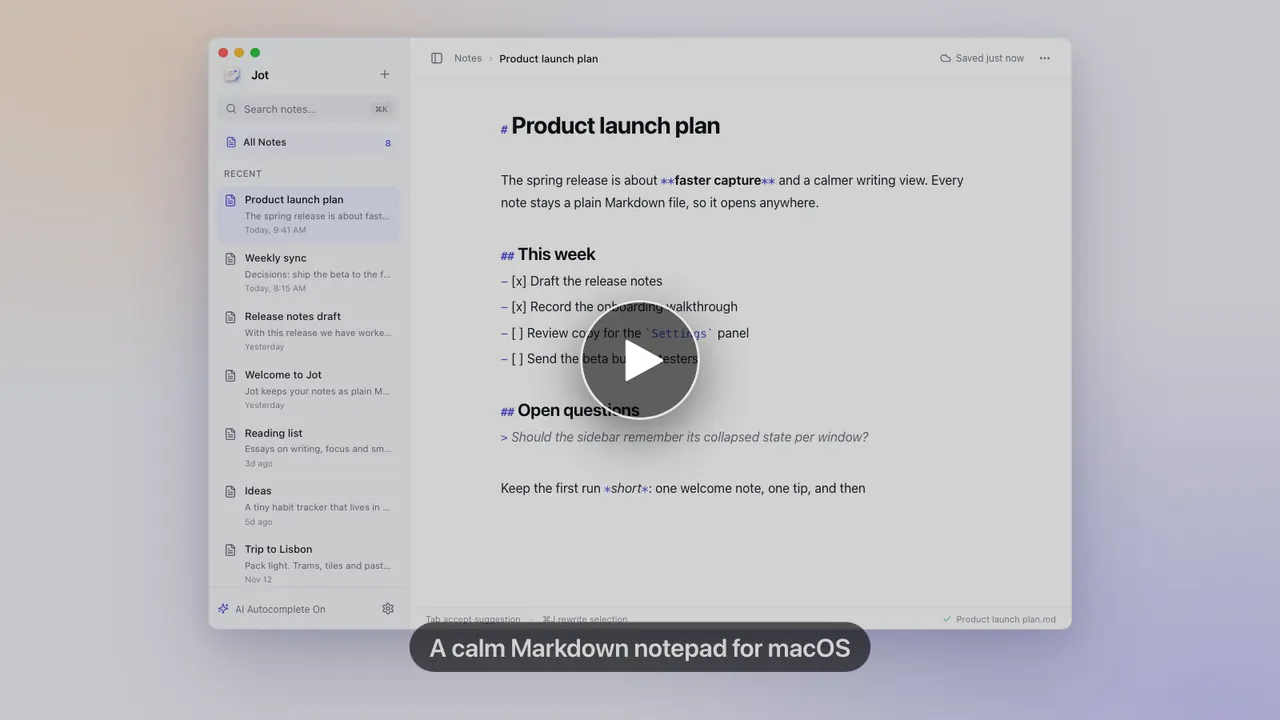
Watch the 31-second explainer (MP4, no audio, captions burned in).
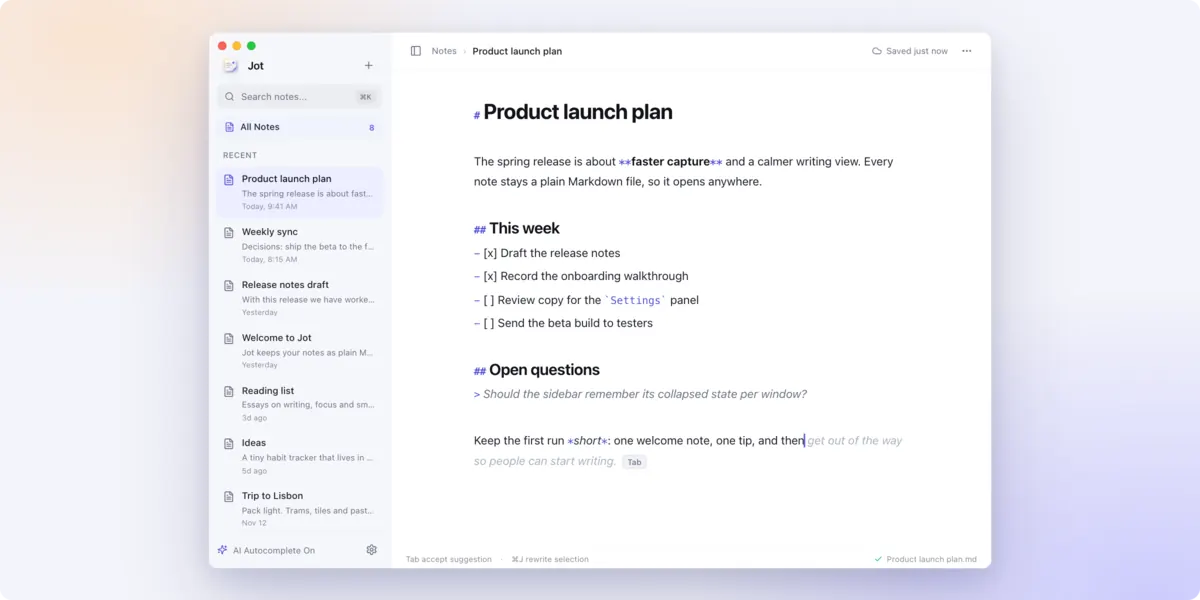
Every screen in this post is a mockup rebuilt from source with Montage (React rebuilds of the Tauri window), filled with synthetic notes and a synthetic masked key. None of them are screen recordings of the running app.
Pause, and Claude finishes the sentence
Write a few words and stop. After 650 ms (you can set anything from 250 to 1,500 ms, in steps of 50), Jot sends Claude the note title, up to 1,500 characters before the caret and up to 400 after it, and asks for a short continuation of 80 tokens at most. The editor header says Thinking... while it waits. Then the rest of your sentence fades in after the caret in gray italics, with a small Tab badge next to it.
Tabaccepts it and it becomes normal text.Escor an arrow key dismisses it.- Keep typing and it never happened.
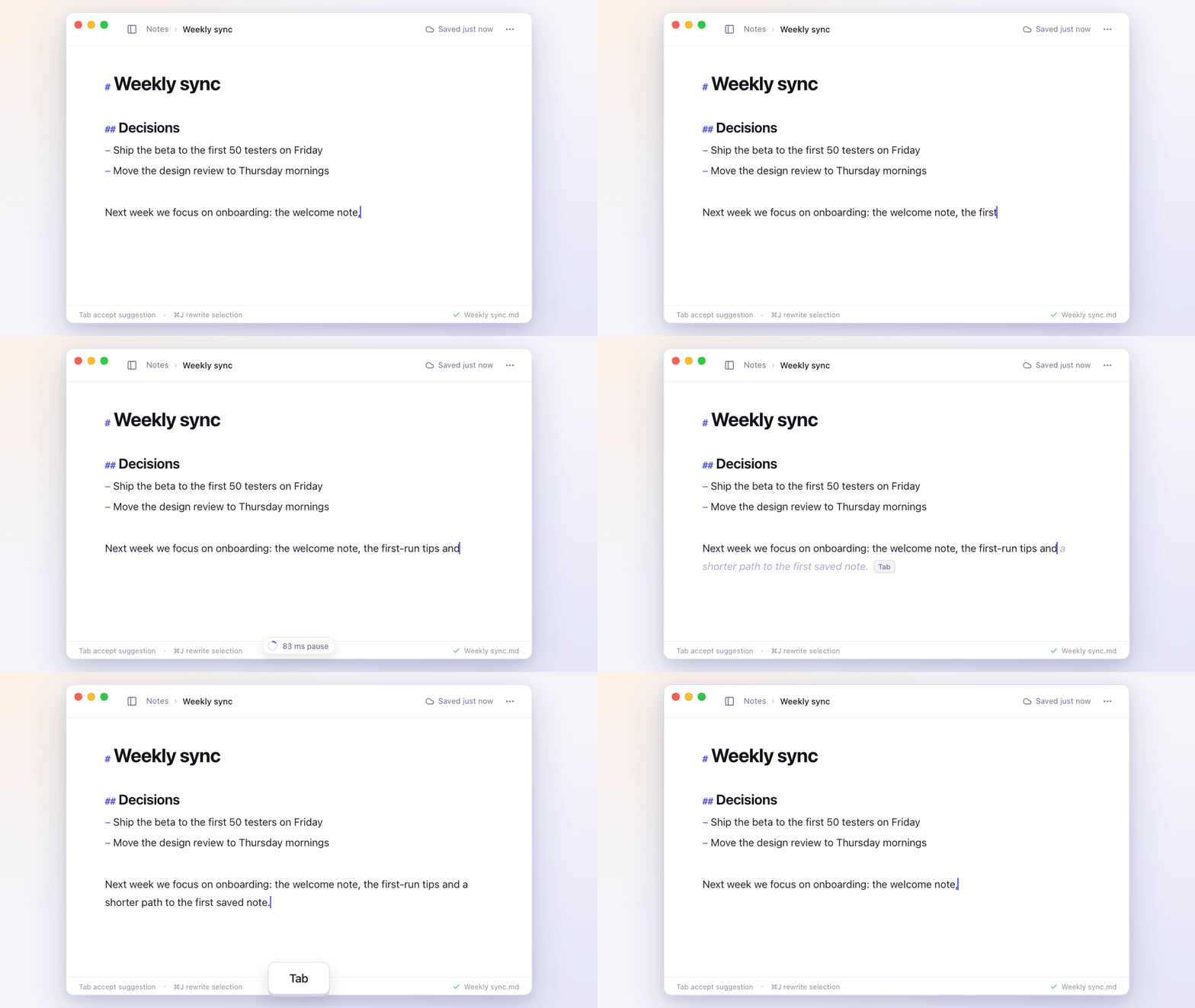
Type, pause, accept with Tab. Animated Montage mockup; the keycaps and pause ring are annotations.
Never in the document early
The suggestion is a CodeMirror widget decoration, drawn next to the text rather than inserted into it. Nothing in the note changes until you press Tab, so undo, autosave and search never see a suggestion you didn't take. And when no suggestion is showing, Tab just indents, like it always did.
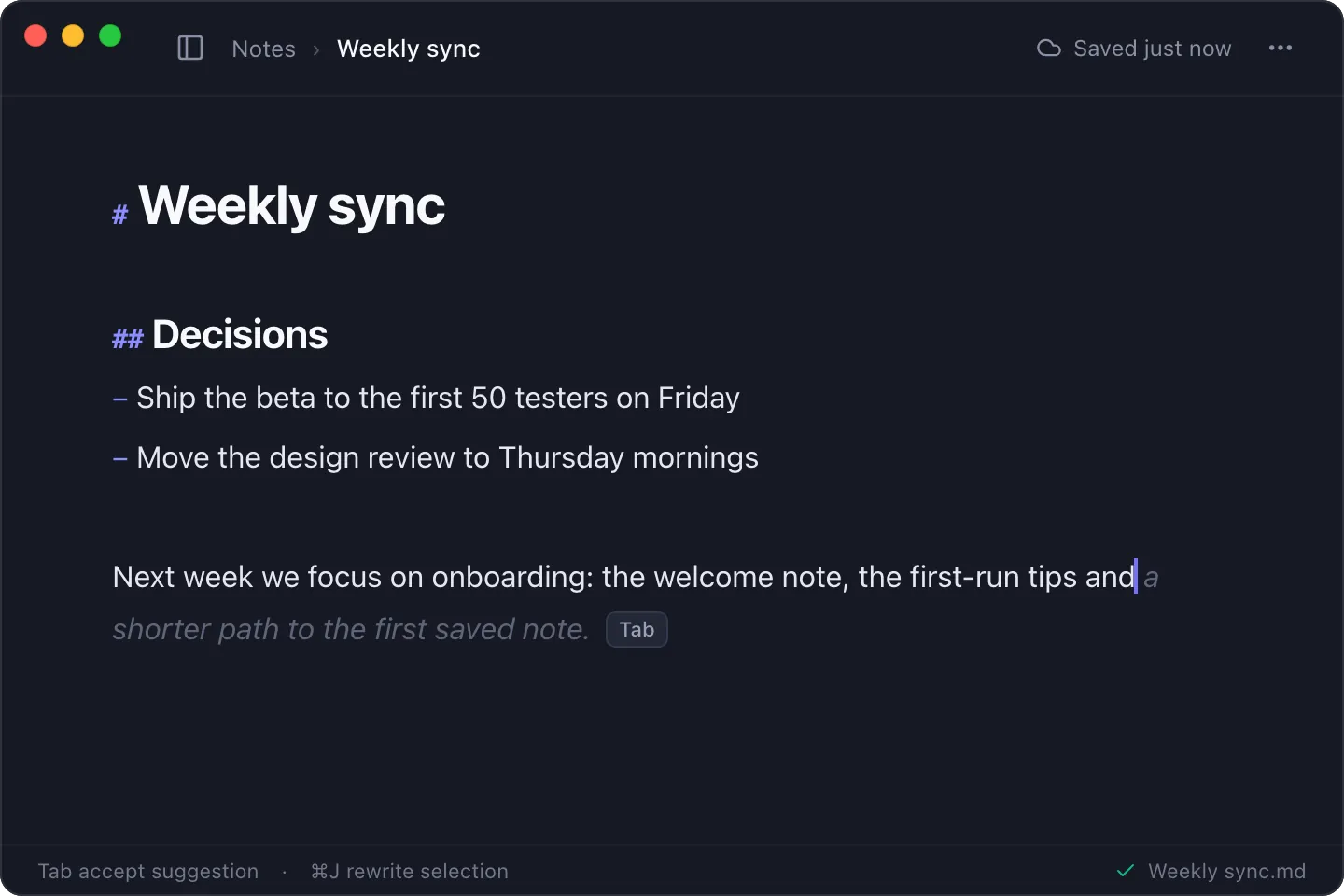
Ghost text at the minimum window size (720×480), sidebar collapsed. Montage mockup.
Stale answers get dropped
This is the subtle part. A network reply can arrive after you've already moved on, and a suggestion for a sentence you've since changed is worse than no suggestion at all. So every request carries a request ID, the caret position and a document revision. Typing, moving the caret or composing with an input method cancels the pending request, and any reply that no longer matches the current state is thrown away. The Rust backend keeps the latest autocomplete request in an AtomicU64, so an older reply can't sneak in behind a newer one.
Here's a toy version you can poke at. The "model" is a handful of canned sentences with a random delay, because this sandbox can't reach any network (and shouldn't). Type at the end of the line, pause, and watch the log. Then type again while it says Thinking... and see the stale reply get dropped.
<style>
:root { color-scheme: dark; }
body { margin: 0; padding: 16px; background: #000; color: #e8e8ee; font: 15px/1.6 ui-sans-serif, system-ui, -apple-system, sans-serif; }
.bar { display: flex; justify-content: space-between; align-items: center; gap: 12px; font-size: 12px; color: #8a8aa0; margin-bottom: 8px; }
.bar label { display: flex; align-items: center; gap: 6px; }
#st { color: #a5a4ff; min-width: 6em; text-align: right; }
.wrap { position: relative; background: #0b0b10; border-radius: 10px; }
.wrap textarea, .wrap .mir { box-sizing: border-box; width: 100%; height: 8.5rem; margin: 0; padding: 12px 14px; font: inherit; line-height: 1.6; white-space: pre-wrap; overflow-wrap: break-word; overflow: hidden; border: 1px solid transparent; border-radius: 10px; }
.mir { position: absolute; inset: 0; pointer-events: none; color: transparent; }
textarea { position: relative; display: block; background: transparent; color: #e8e8ee; caret-color: #a5a4ff; resize: none; outline: none; border-color: #2a2a35 !important; }
textarea:focus { border-color: #5856d6 !important; }
.ghost { color: rgb(232 232 238 / 0.38); font-style: italic; }
.tab { display: inline-block; margin-left: 6px; padding: 0 5px; border: 1px solid #5856d6; border-radius: 4px; color: #a5a4ff; font: 600 10px/1.5 ui-monospace, monospace; vertical-align: 1px; }
#log { margin-top: 10px; max-height: 7.5rem; overflow: auto; font: 12px/1.5 ui-monospace, monospace; color: #8a8aa0; }
.drop { color: #ff8a8a; } .ok { color: #8affc1; }
</style>
<div class="bar">
<label>Pause <input id="d" type="range" min="250" max="1500" step="50" value="650"> <span id="dv">650 ms</span></label>
<span id="st"></span>
</div>
<div class="wrap">
<div class="mir" id="mir" aria-hidden="true"></div>
<textarea id="ta" spellcheck="false" aria-label="Type here, then pause">The spring release is about</textarea>
</div>
<div id="log" aria-live="polite"></div>
<script>
const ta = document.getElementById("ta"), mir = document.getElementById("mir");
const st = document.getElementById("st"), log = document.getElementById("log");
const d = document.getElementById("d"), dv = document.getElementById("dv");
const canned = [
" and nothing touches the note until you press Tab.",
" faster capture and fewer clicks between a thought and a note.",
" so the draft is ready before the Friday review.",
" which keeps every note a plain Markdown file.",
" and the rest can wait until Monday."
];
let rev = 0, req = 0, latest = 0, timer = 0, ghost = "";
const esc = (s) => s.replace(/&/g, "&").replace(/</g, "<");
function paint() {
mir.innerHTML = esc(ta.value) + (ghost ? '<span class="ghost">' + esc(ghost) + '</span><span class="tab">Tab</span>' : "") + "";
}
function note(cls, msg) {
const p = document.createElement("div");
p.className = cls; p.textContent = msg; log.prepend(p);
}
function cancel(why) {
clearTimeout(timer);
if (latest) { note("drop", "#" + latest + " cancelled: " + why); latest = 0; st.textContent = ""; }
}
function ask() {
if (ta.selectionStart !== ta.value.length || ta.value.trim().length < 3) return;
const id = ++req, r = rev;
latest = id; st.textContent = "Thinking...";
note("", "#" + id + " sent at revision " + r);
setTimeout(() => {
if (id !== latest || r !== rev) { note("drop", "#" + id + " reply dropped: it was for revision " + r + ", the note is at " + rev); return; }
latest = 0; st.textContent = "";
let g = canned[id % canned.length];
if (/\s$/.test(ta.value)) g = g.trimStart();
ghost = g; paint();
note("ok", "#" + id + " shown as ghost text");
}, 300 + Math.random() * 900);
}
d.addEventListener("input", () => { dv.textContent = d.value + " ms"; });
ta.addEventListener("input", () => {
rev++; ghost = ""; paint();
cancel("you kept typing");
timer = setTimeout(ask, +d.value);
});
ta.addEventListener("keydown", (e) => {
if (e.key === "Tab") {
e.preventDefault();
if (ghost) {
ta.value += ghost; ghost = ""; rev++; paint();
ta.setSelectionRange(ta.value.length, ta.value.length);
note("ok", "accepted with Tab");
} else {
ta.setRangeText(" ", ta.selectionStart, ta.selectionEnd, "end"); rev++; paint();
}
} else if (e.key === "Escape" || e.key.startsWith("Arrow")) {
cancel("the caret moved");
if (ghost) { ghost = ""; paint(); note("", "ghost text dismissed"); }
}
});
ta.addEventListener("scroll", () => { mir.scrollTop = ta.scrollTop; });
ta.setSelectionRange(ta.value.length, ta.value.length);
paint();
timer = setTimeout(ask, 900);
</script>
⌘J: six ways to say it better
Select some text and a Rewrite with AI toolbar appears next to it. ⌘J opens it for the current selection too. Pick an action and Jot sends Claude the selection, the instruction and up to 600 characters of the surrounding text, then shows the replacement as a preview right where the original sits.
| Action | What Claude is asked to do |
|---|---|
| Polish | Improve clarity, flow and readability |
| Fix grammar | Correct grammar, spelling and punctuation |
| Shorter | Make the text more concise |
| Professional | Shift to a polished, formal tone |
| Casual | Shift to a warm, conversational tone |
| Custom | Follow an instruction you type |
Enter accepts, Esc rejects. Accepting replaces the original selection in a single CodeMirror transaction, which means one ⌘Z brings your original words back. No archaeology through a dozen tiny undo steps.
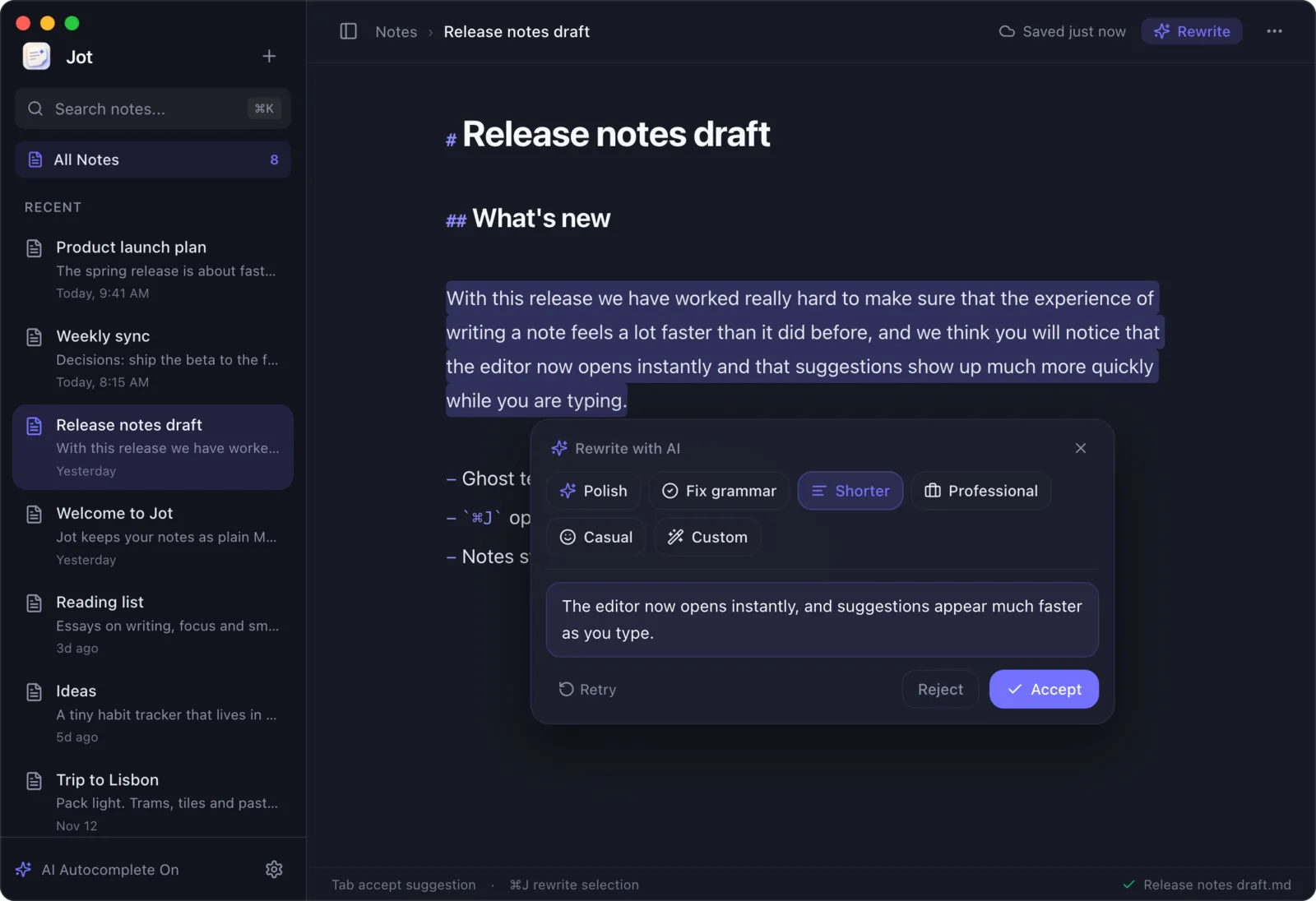
The rewrite toolbar with Shorter picked and the preview waiting. Montage mockup.
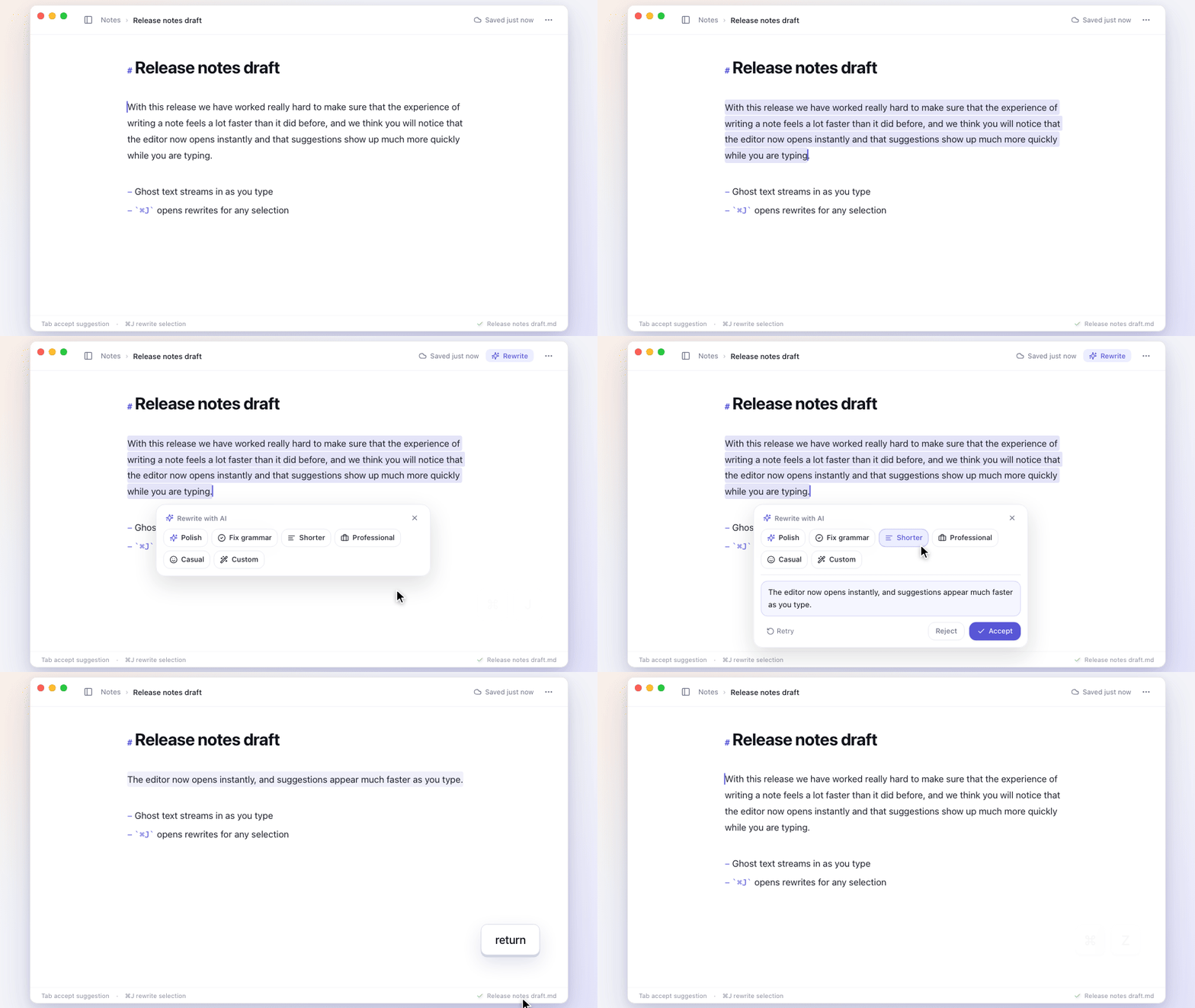
Select, ⌘J, Shorter, Return, then ⌘Z. Animated Montage mockup.
Try the flow below. Again, the rewrites are canned so the playground works offline: in Jot, each of these buttons is a call to Claude. Pick one, accept it, then hit Undo (or ⌘Z) and watch the whole rewrite come back as one step.
<style>
  :root { color-scheme: dark; }
  body { margin: 0; padding: 16px; background: #000; color: #e8e8ee; font: 15px/1.6 ui-sans-serif, system-ui, -apple-system, sans-serif; }
  #txt { padding: 12px 14px; border: 1px solid #2a2a35; border-radius: 10px; background: #0b0b10; }
  #txt mark { background: rgb(88 86 214 / 0.35); color: inherit; border-radius: 3px; }
  .tools { display: flex; flex-wrap: wrap; gap: 6px; margin: 10px 0; }
  button { font: 13px system-ui, sans-serif; color: #e8e8ee; background: #15151d; border: 1px solid #2a2a35; border-radius: 7px; padding: 5px 10px; cursor: pointer; }
  button:hover:not(:disabled) { border-color: #5856d6; }
  button.on { background: #5856d6; border-color: #5856d6; }
  button:disabled { opacity: 0.4; cursor: default; }
  #prev { display: none; padding: 10px 14px; border: 1px dashed #5856d6; border-radius: 10px; color: #c9c8ff; }
  #prev .row { display: flex; gap: 6px; margin-top: 8px; }
  #log { margin-top: 10px; font: 12px/1.5 ui-monospace, monospace; color: #8a8aa0; }
</style>
<div id="txt"><mark id="sel"></mark></div>
<div class="tools" id="tools"></div>
<div id="prev"><div id="out"></div><div class="row"><button id="acc">Accept ↩</button><button id="rej">Reject esc</button></div></div>
<div class="tools"><button id="undo" disabled>Undo ⌘Z</button></div>
<div id="log" aria-live="polite">Pick a rewrite for the highlighted text.</div>
<script>
  const original = "So basically what we want to do in this next sprint is to try to make sure that the onboarding flow is a lot simpler than it currently is right now, because at the moment a lot of people seem to get kind of lost somewhere around the second step.";
  const rewrites = {
    "Polish": "In the next sprint, we want to make the onboarding flow much simpler. Right now, many people get lost around the second step.",
    "Fix grammar": "So basically, what we want to do in this next sprint is try to make sure the onboarding flow is a lot simpler than it is right now, because at the moment a lot of people seem to get lost somewhere around the second step.",
    "Shorter": "Next sprint: simplify onboarding. People get lost at step two.",
    "Professional": "In the upcoming sprint, we will simplify the onboarding flow, as many users currently lose their way at the second step.",
    "Casual": "Next sprint, let's make onboarding way simpler. Right now folks keep getting lost around step two."
  };
  const sel = document.getElementById("sel"), tools = document.getElementById("tools");
  const prev = document.getElementById("prev"), out = document.getElementById("out");
  const undo = document.getElementById("undo"), log = document.getElementById("log");
  const history = [original];
  let pending = null;
  const current = () => history[history.length - 1];
  function render() {
    sel.textContent = current();
    undo.disabled = history.length < 2;
    for (const b of tools.children) b.disabled = history.length > 1 || pending !== null;
  }
  for (const name of Object.keys(rewrites)) {
    const b = document.createElement("button");
    b.textContent = name;
    b.onclick = () => {
      for (const x of tools.children) x.classList.remove("on");
      b.classList.add("on");
      pending = name; render();
      prev.style.display = "block"; out.textContent = "Rewriting...";
      log.textContent = "Sent: the selection, \"" + name + "\" and the surrounding text.";
      setTimeout(() => { if (pending === name) out.textContent = rewrites[name]; }, 500);
    };
    tools.appendChild(b);
  }
  function close() { pending = null; prev.style.display = "none"; for (const x of tools.children) x.classList.remove("on"); render(); }
  function accept() {
    if (!pending || out.textContent === "Rewriting...") return;
    history.push(rewrites[pending]);
    log.textContent = "Accepted " + pending + " as one transaction. One undo brings the original back.";
    close();
  }
  function reject() { if (!pending) return; log.textContent = "Rejected. The note never changed."; close(); }
  function doUndo() {
    if (history.length < 2) return;
    history.pop(); log.textContent = "Undone in one step: the original text is back."; render();
  }
  document.getElementById("acc").onclick = accept;
  document.getElementById("rej").onclick = reject;
  undo.onclick = doUndo;
  document.addEventListener("keydown", (e) => {
    if (e.key === "Enter" && pending) { e.preventDefault(); accept(); }
    else if (e.key === "Escape") reject();
    else if ((e.metaKey || e.ctrlKey) && e.key.toLowerCase() === "z") { e.preventDefault(); doUndo(); }
  });
  render();
</script>
Your key stays in the Keychain, your notes stay Markdown
Two promises sit underneath the AI features.
The key never leaves the Keychain
Your Anthropic API key lives in the macOS Keychain (service com.jot.app, account claude-api-key), read and written through /usr/bin/security. It is never sent back to the interface, logged, or written to localStorage or the settings file. Settings only ever shows a masked form such as sk-ant-•••a1b2.
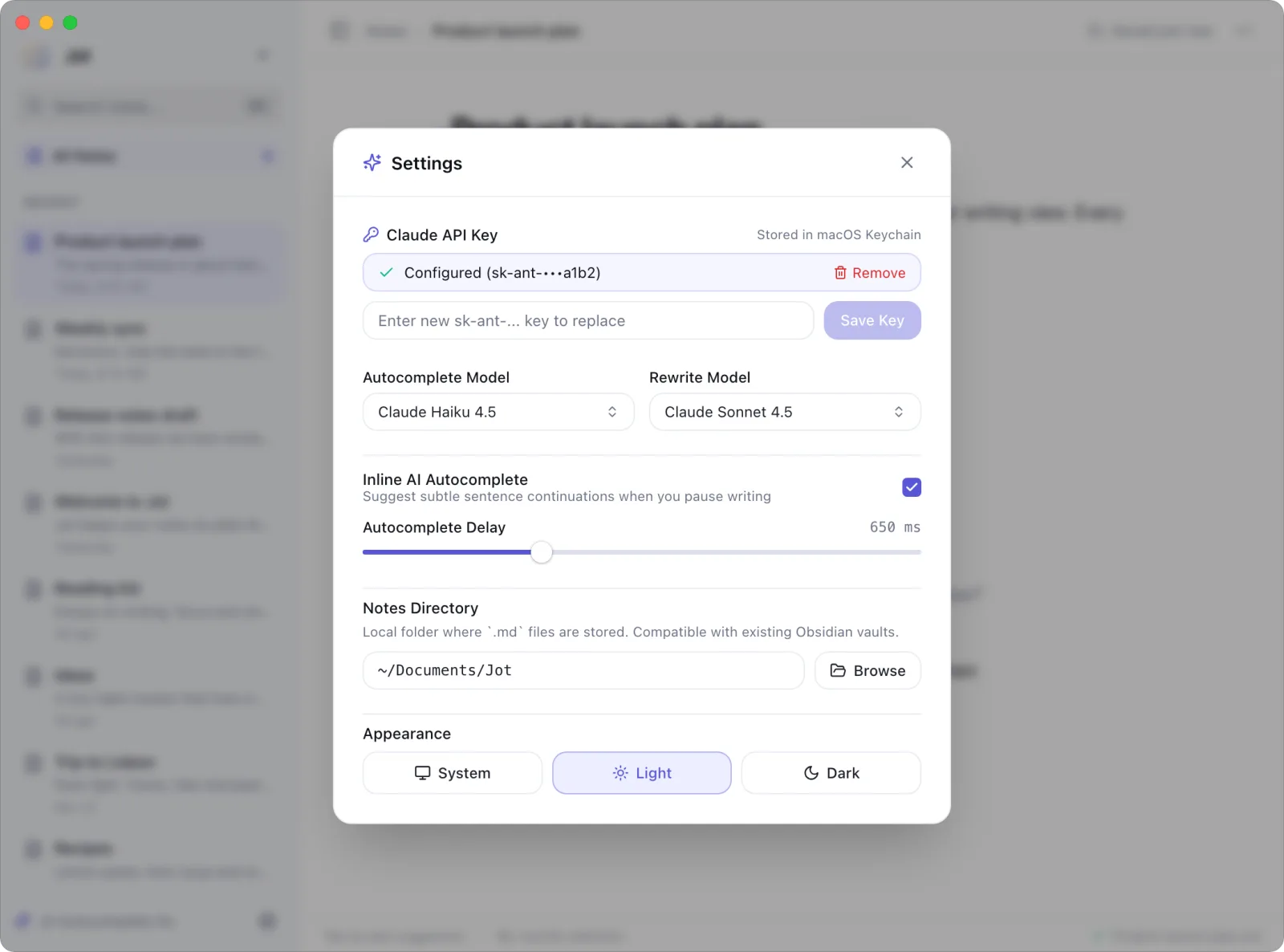
Settings: key, models, delay, folder and theme. The key shown is synthetic. Montage mockup.
The privacy story is short because there's not much to tell:
- Notes stay on your Mac. Notes, settings and the key are stored locally. There is no account, sync, analytics or telemetry.
- Text goes to Anthropic only when the AI runs. With a key set and autocomplete on, each pause sends the note title and up to 1,900 characters around the caret. Each rewrite sends the selection, your instruction and up to 600 characters of context. Requests go straight from your Mac to
api.anthropic.comwith your own key, and Anthropic's terms apply to that data. - No key, no traffic. With no API key set, Jot is a plain local Markdown notepad and makes no network requests at all.
Every note is a plain .md file
Notes live as .md files in a folder you pick, ~/Documents/Jot by default. On first launch Jot creates that folder with a Welcome to Jot note. Point it at an existing folder or an Obsidian vault and it opens it in place, without importing, converting or touching the files already there.
Because those are your files, Jot is careful with them:
- Safe saves. Edits autosave 300 ms after you stop typing. Each write goes to a temporary
.jot-tmp-*file in the same folder and is renamed into place, so a crash never leaves half a note. - No overwrites. A new or renamed note whose title is taken gets a numbered name (
Untitled.md,Untitled 2.md). - A fenced-in file layer. File commands reject
.., slashes, dotfiles and anything that isn't.md.
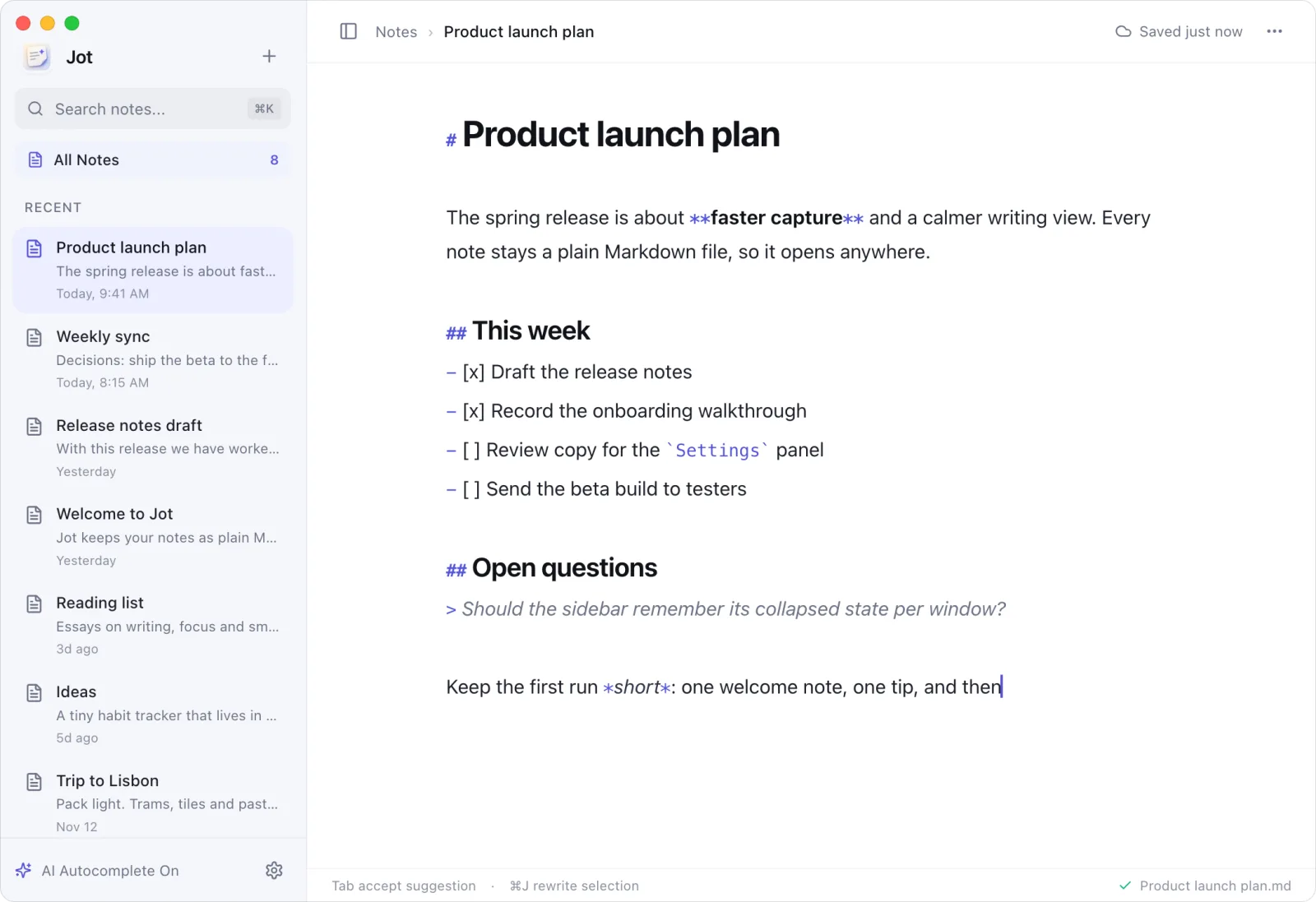
The editor: source Markdown in a 680 px CodeMirror 6 column with indigo syntax marks. Montage mockup.
The editor itself is deliberately plain. You see the Markdown source, with headings, emphasis, links, code, quotes, lists and tasks highlighted. Click a [ ] marker or press ⌘↩ to toggle a task. ⌘K searches titles, filenames and note bodies, with title matches first and then the most recently edited notes. The theme switches instantly between Light, Dark and System from Settings. Light is the default.
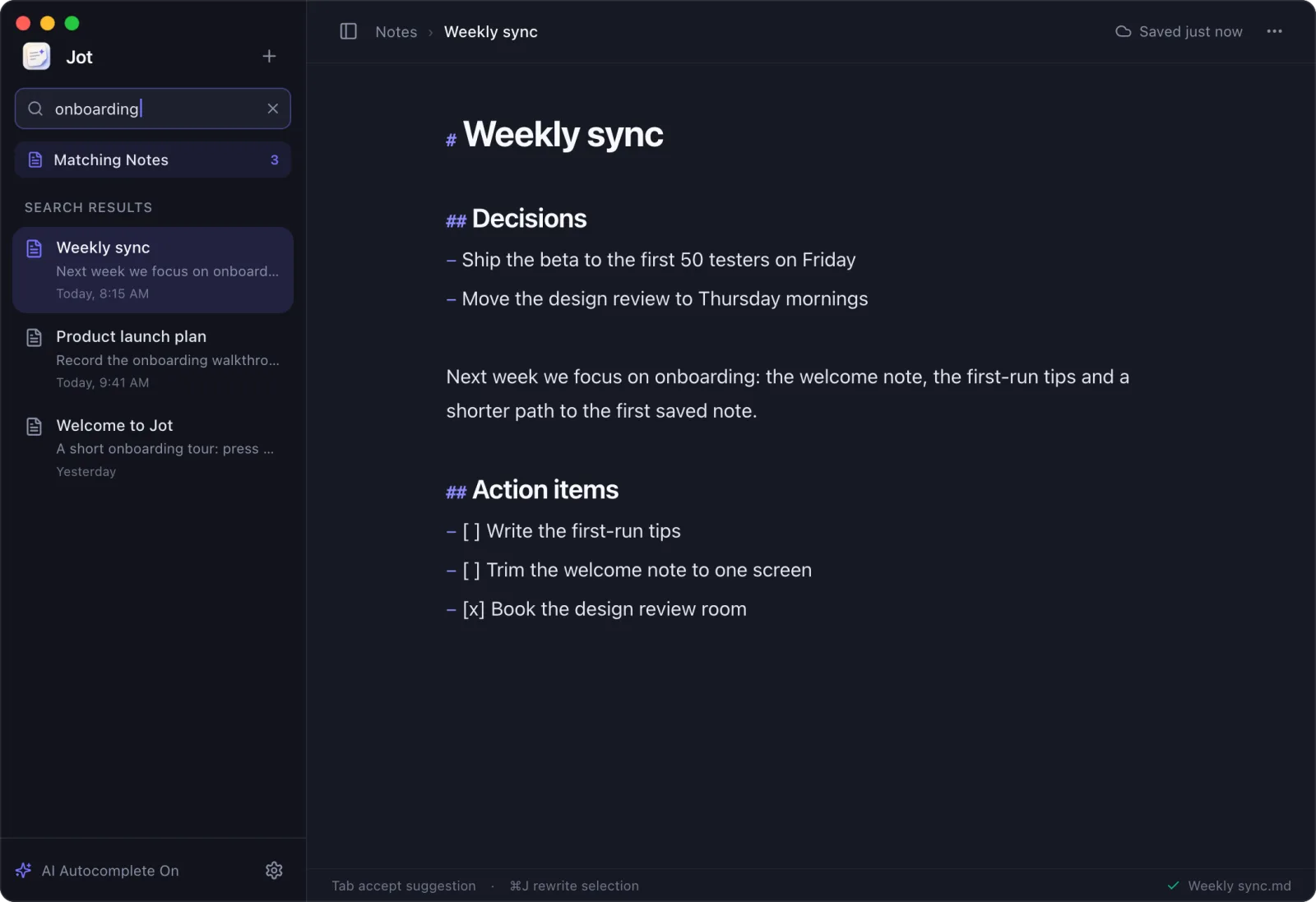
⌘K search matching note bodies, in the dark theme. Montage mockup.
Two builds, one notes folder
Here's the slightly unusual bit: the repo holds two Mac apps that read and write the same files. The Tauri app has the full shortcut set. JotMac is a native SwiftUI and AppKit port with ghost text, rewrites and search.
| Jot (Tauri) | JotMac (native) | |
|---|---|---|
| Stack | Tauri 2.5, Rust backend, React 19, CodeMirror 6, Tailwind CSS 4 | Swift 6 package, SwiftUI NavigationSplitView, AppKit NSTextView |
| Ghost text and rewrites | Yes | Yes |
| Search | Sidebar search field and ⌘K | Sidebar search field |
| Shared | ~/Documents/Jot, ~/.jot/settings.json, the Keychain item | The same |
JotMac needs macOS 14 or later. Both apps share the notes folder, the settings file and the Keychain entry, so you can switch between them and your notes and key come with you.
Under the hood
The Tauri app is a React frontend talking to a Rust backend over Tauri IPC. The backend owns the files, the Keychain and the network.
Editor (React 19 · CodeMirror 6)
   │  Tauri IPC
   ▼
Rust backend (notes.rs · ai.rs)
   ├──► Notes folder      plain .md files
   ├──► macOS Keychain    API key
   └──► Anthropic         Messages API over HTTPS
- Editor.
src/App.tsxholds the app state, the autosave queue, global shortcuts and theme sync.src/editor/autocomplete.tsowns the ghost-text state field, the debounce and the revision guard, andsrc/editor/markdown.tsthe highlighting, theme and keymap. - IPC boundary.
src/services/notes.tsandsrc/services/ai.tsare the only places that call Tauri commands. The frontend never sees the API key. - Files.
src-tauri/src/notes.rscanonicalizes the notes folder, validates every filename, writes through a temp file and an atomic rename, and runs the search. - AI.
src-tauri/src/ai.rsreads the key from the Keychain and calls the Anthropic Messages API withreqwest, with a 12 s timeout for completions. - Native port.
macos/Sources/JotCorereimplements the note store, Keychain store and Claude client in Swift, andmacos/Sources/JotMacdraws the SwiftUI window with an AppKit text view that renders the ghost text.
Autocomplete and rewrites each get their own model: Claude Haiku 4.5, Claude Sonnet 4.5 or Claude Sonnet 4. Out of the box, the fast one writes ghost text and the bigger one does rewrites. These are the defaults the README lists for the settings in ~/.jot/settings.json (the key is never part of that file):
{
  "notesDir": "~/Documents/Jot",
  "autocompleteEnabled": true,
  "autocompleteDelayMs": 650,
  "autocompleteModel": "claude-haiku-4-5-20251001",
  "rewriteModel": "claude-sonnet-4-5-20250929",
  "appearance": "light"
}
The keyboard does most of the work:
| Shortcut | Action |
|---|---|
⌘N | New note |
⌘K | Search notes by title or content |
⌘J | Rewrite the selection |
Tab | Accept ghost text (indent otherwise) |
Esc | Dismiss ghost text, the rewrite toolbar or a dialog |
⌘B / ⌘I | Toggle bold or italic on the selection |
⌘↩ | Toggle the task checkbox on the current line |
⌘, | Open or close Settings |
⌘Z / ⇧⌘Z | Undo and redo, including accepted suggestions and rewrites |
It's tested on all three layers: 11 Vitest tests for the frontend (the 650 ms wait, Tab and Escape, stale replies, note CRUD, search, the rewrite preview and undo after a rewrite), 6 Rust tests for the sandboxed file layer, settings that never store the key, key masking and UTF-8 safe context truncation, and 3 XCTest cases for the Swift note store, settings and key masking, and completion cleanup.
Jot is built from source. If you have access, it's a handful of commands:
pnpm install              # frontend and Tauri CLI dependencies
pnpm tauri dev            # Vite dev server with hot reload inside the Tauri window
pnpm macos:build          # build Jot.app and a DMG
pnpm macos:native:build   # build and sign macos/build/JotMac.app
pnpm test                 # Vitest suites
cargo test --manifest-path src-tauri/Cargo.toml
pnpm macos:native:test    # XCTest suite for JotCore
You'll need a Mac, Node.js 20 or later, pnpm 11 or later, Rust with cargo, and the Xcode command line tools with Swift 6 for JotMac.
What's not there yet
Jot is in development, and the README is upfront about the rough edges:
- Not notarized. Builds are signed ad hoc, so Gatekeeper asks for confirmation on first launch.
- Apple silicon only, for now. The DMG is built for
aarch64. Intel Macs need a local build. - A fixed model list. The pickers offer three hard-coded Claude model IDs, so retiring one means a code change.
- Two builds to keep in step. The Tauri app and JotMac are separate implementations, and JotMac has no ⌘K yet.
- Placeholder identifiers. The bundle and Keychain IDs (
com.jot.*) are placeholders, and the name Jot is shared with other notes apps.
What's next, straight from the roadmap:
- Sign with a Developer ID and notarize the builds
- A universal DMG for Intel and Apple silicon
- Load the model list from settings instead of hard-coding it
- Bring JotMac's shortcuts in line with the Tauri app, starting with ⌘K
- Pick final bundle and Keychain identifiers before any public release
Jot is unofficial and not affiliated with or endorsed by Anthropic. Claude is a trademark of Anthropic. Jot opens Obsidian vaults as plain folders and is not affiliated with or endorsed by Obsidian.
Jot has its own card on the projects page, with the demo loop, the explainer and the stack at a glance.
Curious about the source? It's private, but access can be granted to anyone interested in contributing. Get in touch.