🪷 Noema: where sound becomes vision
Noema is where sound becomes vision. Layer synthesized or imported sound, shape ten GPU-rendered worlds that react to the real output mix, map signals like heart rate and breathing onto them, and play the results as sessions, meditations and playlists. Offline, no account.
By Dennis Bruijn · · 10 min read · #projects #cross-platform #cpp #webgl #swift #kotlin #electron #audio
I gave this project one rule before I wrote a line of it: nothing is faked. If a petal swells on the bass, it's because the audio engine heard bass in the mix that is actually leaving your speakers. If the colors follow a heartbeat, it's either your heartbeat from an Apple Watch or a simulator that says Simulated right there on screen. No canned animation pretending to listen, no number on screen that didn't come from somewhere.
That rule turned a "pretty visualizer" into something closer to a small studio: a synth, two editors, a signal router, a session player and a file format, on iPhone, iPad, Mac, Apple Watch, Android and Windows. Here's the 31-second version:
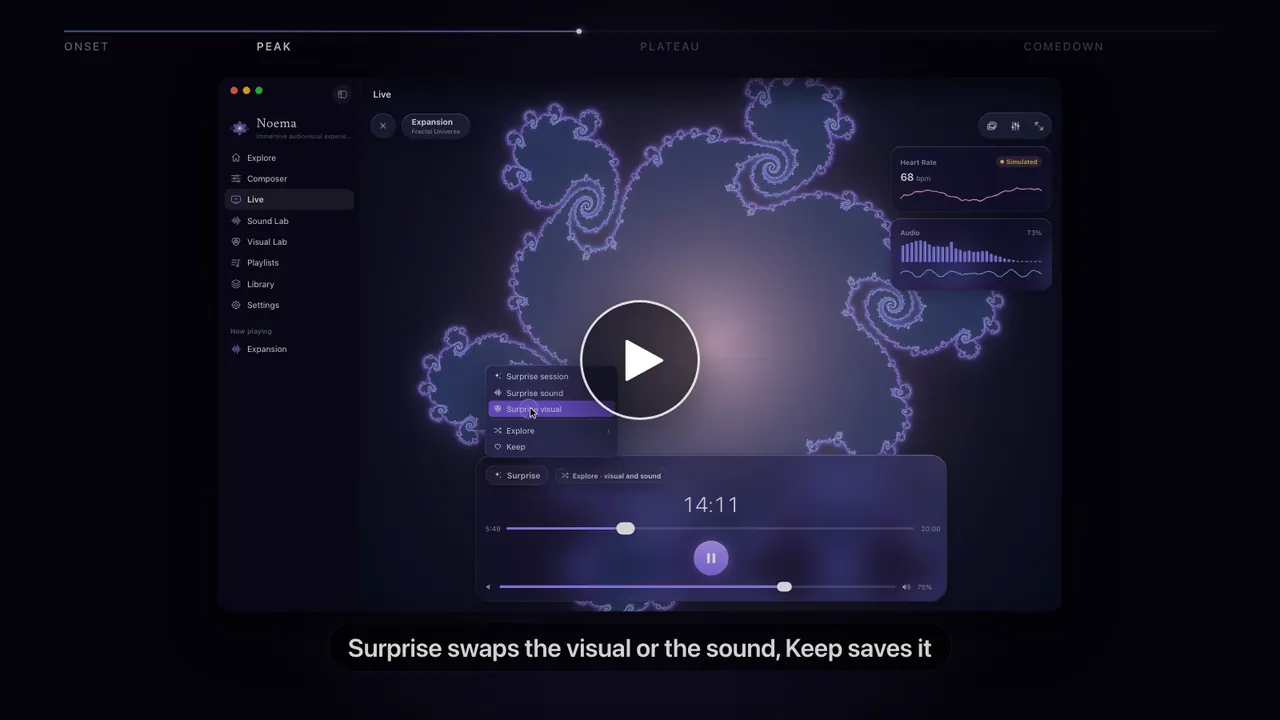
31 seconds, no audio. Made with Montage, my shared Remotion studio: the worlds are Noema's own renderer shaders, the UI around them is rebuilt from the SwiftUI views and design tokens, and every heart-rate, breathing and meter value is synthetic.
Ten worlds that hear the actual mix
Every visual world reads the engine's analysis of the output mix, frame by frame: level, bass, mids, treble, spectral centroid, flux, onsets and beats. The engine does the listening. The worlds just get very good at reacting.
The Circular Spectrum world and the analysis card that drives it, a Montage recreation. The motion follows the engine's analysis of a real mix, so the meters show the numbers that move the shader, frame for frame, for a mix you don't hear.
Each world is a generator in the renderer, most of them a GLSL shader. The 17 built-in visual presets use one or two of them as layers:
| World | What it draws |
|---|---|
| Fractal Universe | Recursive kaleidoscopic and Julia-style structures with orbit-trap glow. |
| Particle Cosmos | A GPU particle galaxy on curl-noise flow fields, with trails and touch attraction. |
| Fluid Dreamscape | Domain-warped noise ribbons and silky displacement, layered. |
| Sacred Geometry | Flower-of-life lattices, petal rosettes and concentric orbits. |
| Shape Field | GPU-instanced circles, rings, polygons, stars, arcs and petals that drift, orbit, swirl or bounce. |
| Infinite Tunnel | An endless vortex of luminous rings and spiral seams. Touch steers the vanishing point. |
| Aurora | Curtains of light over a starfield. Touch bends the curtains. |
| Living Cells | A Voronoi field with glowing membranes that breathe, drift and swell around touch. |
| Waveform | An oscilloscope ribbon of the real output waveform, with feedback persistence. |
| Circular Spectrum | Radial or linear bars from the real 64-bin spectrum. |
A bloom that only moves when it hears something
Here's the idea in a few dozen lines you can poke at. To be clear, this is not Noema's code: Noema analyzes the mix inside its C++ engine, and this toy uses the browser's AnalyserNode. But the principle is the same. Press Play for a drone and a soft kick. Until you do, nothing moves, because there's nothing to hear.
<style>
  body { margin: 0; background: #05040c; color: #e9e6ff; font: 12px system-ui, sans-serif; }
  canvas { display: block; width: 100%; height: 170px; }
  .bar { display: flex; gap: .75rem; align-items: center; padding: .5rem .75rem; }
  button { font: inherit; color: inherit; background: #a388ff26; border: 1px solid #a388ff80; border-radius: 999px; padding: .25rem .9rem; cursor: pointer; }
  output { opacity: .7; font-variant-numeric: tabular-nums; }
</style>
<canvas id="c"></canvas>
<div class="bar"><button id="play">Play</button><output id="read">Silence. Nothing moves.</output></div>
<script>
  const c = document.getElementById("c"), g = c.getContext("2d"), read = document.getElementById("read");
  let an, bins, prevBass = 0, flash = 0, spin = 0, tick = 0;

  document.getElementById("play").onclick = (e) => {
    if (an) return;
    const ac = new AudioContext(), out = ac.createGain();
    an = ac.createAnalyser(); an.fftSize = 256; bins = new Uint8Array(an.frequencyBinCount);
    out.gain.value = 0.2; out.connect(an); an.connect(ac.destination);

    // A drone: a sawtooth through a low-pass filter that a slow LFO opens and closes.
    const saw = ac.createOscillator(), lp = ac.createBiquadFilter(), lfo = ac.createOscillator(), depth = ac.createGain();
    saw.type = "sawtooth"; saw.frequency.value = 55; lp.frequency.value = 600;
    lfo.frequency.value = 0.1; depth.gain.value = 500;
    lfo.connect(depth).connect(lp.frequency); saw.connect(lp).connect(out); saw.start(); lfo.start();

    // A soft kick every 750 ms (something to call an onset), and a bell on every other beat.
    setInterval(() => {
      const now = ac.currentTime, kick = ac.createOscillator(), env = ac.createGain();
      kick.frequency.setValueAtTime(140, now); kick.frequency.exponentialRampToValueAtTime(40, now + 0.2);
      env.gain.setValueAtTime(1, now); env.gain.exponentialRampToValueAtTime(0.001, now + 0.4);
      kick.connect(env).connect(out); kick.start(now); kick.stop(now + 0.4);
      if (tick++ % 2) {
        const bell = ac.createOscillator(), benv = ac.createGain();
        bell.type = "triangle"; bell.frequency.value = [660, 880, 990, 1320][Math.floor(Math.random() * 4)];
        benv.gain.setValueAtTime(0.4, now); benv.gain.exponentialRampToValueAtTime(0.001, now + 0.6);
        bell.connect(benv).connect(out); bell.start(now); bell.stop(now + 0.6);
      }
    }, 750);
    e.target.textContent = "Playing";
  };

  // Average a run of FFT bins into 0..1. At 48 kHz each bin is about 190 Hz wide.
  const band = (a, b) => { let s = 0; for (let i = a; i <= b; i++) s += bins[i]; return s / (b - a + 1) / 255; };

  function frame() {
    const dpr = devicePixelRatio, w = c.clientWidth * dpr, h = c.clientHeight * dpr;
    if (c.width !== w || c.height !== h) { c.width = w; c.height = h; }
    let bass = 0, mids = 0, treble = 0;
    if (an) {
      an.getByteFrequencyData(bins);
      bass = band(0, 1); mids = band(2, 10); treble = band(11, 63);
      if (bass - prevBass > 0.12) flash = 1; // a crude onset: the bass jumped since the last frame
      prevBass = bass;
      read.textContent = `bass ${bass.toFixed(2)} · mids ${mids.toFixed(2)} · treble ${treble.toFixed(2)}`;
    }
    spin += mids * 0.04; flash *= 0.9;

    g.fillStyle = "rgb(5 4 12 / .35)"; g.fillRect(0, 0, w, h); // a short trail
    const r = Math.min(w, h) / 2, len = r * (0.35 + bass * 0.55);
    g.save(); g.translate(w / 2, h / 2); g.rotate(spin);
    g.shadowColor = "#a388ff"; g.shadowBlur = (8 + treble * 60) * dpr;
    g.fillStyle = `hsl(${255 - treble * 80} 90% ${60 + flash * 25}% / .55)`;
    for (let i = 0; i < 6; i++) {
      g.rotate(Math.PI / 3);
      g.beginPath(); g.ellipse(0, -len / 2, len * 0.22, len / 2, 0, 0, Math.PI * 2); g.fill();
    }
    g.shadowBlur = 0; g.lineWidth = 1.5 * dpr;
    g.strokeStyle = `rgb(233 230 255 / ${0.15 + flash * 0.6})`;
    g.beginPath(); g.arc(0, 0, r * 0.92, 0, Math.PI * 2); g.stroke();
    g.restore();
    requestAnimationFrame(frame);
  }
  frame();
</script>
Try changing the band ranges in band(...), or swap the 55 Hz drone for something higher, and watch which petals stop caring.
Two labs, 34 signals and 24 experiences
Worlds are only half of it. The other half is the stuff you make and play.
Sound Lab lets you layer sine, triangle, square and sawtooth tones, white, pink and brown noise, harmonic drones, AM and FM tones and evolving textures, then shape them with ADSR, filters, LFOs, tremolo, delay and reverb. You hear every change live.
Visual Lab stacks and blends layers, lets you edit every parameter, pick from 12 palettes, randomize, and pause the animation while you fiddle. Undo and redo work in both labs, because "randomize" without undo is just a slot machine.
Reactive mappings
This is the part I'm proudest of. Any of 34 signals (audio, touch or mouse, device motion, guided breathing, microphone level, heart rate, depth, session and playlist progress) can drive any mappable parameter. Each mapping has range, curve, smoothing, hysteresis, rate limit and combine options, with live readouts so you can see what's going on.
Three of those options fit in a playground. Drag the heart rate, then play with the curve and the smoothing. Note the label: if a value isn't real, it says so.
<style>
  body { margin: 0; background: #05040c; color: #e9e6ff; font: 12px system-ui, sans-serif; display: grid; grid-template-columns: 1fr 1fr; align-items: center; gap: .5rem; padding: .5rem; box-sizing: border-box; min-height: 13rem; }
  label { display: block; margin-bottom: .6rem; }
  input, select { display: block; width: 100%; margin-top: .25rem; accent-color: #a388ff; font: inherit; }
  .sim { padding: 0 .35rem; border-radius: 4px; background: #ffb02e33; color: #ffcf7a; font-weight: 600; }
  canvas { width: 100%; height: 150px; }
  output { grid-column: 1 / -1; opacity: .7; font-variant-numeric: tabular-nums; }
</style>
<div>
  <label>Heart rate <span class="sim">Simulated</span> <b id="bpmOut"></b>
    <input id="bpm" type="range" min="50" max="140" value="72"></label>
  <label>Curve
    <select id="curve"><option>linear</option><option>ease in</option><option>ease out</option></select></label>
  <label>Smoothing
    <input id="smooth" type="range" min="0" max="0.98" step="0.01" value="0.9"></label>
</div>
<canvas id="c"></canvas>
<output id="out"></output>
<script>
  const $ = (id) => document.getElementById(id), c = $("c"), g = c.getContext("2d");
  const curves = { "linear": (x) => x, "ease in": (x) => x * x, "ease out": (x) => 1 - (1 - x) ** 2 };
  let smoothed = 0.25, phase = 0, last = performance.now();

  function frame(now) {
    const dt = Math.min((now - last) / 1000, 0.1); last = now;
    const bpm = +$("bpm").value, k = +$("smooth").value;
    const x = (bpm - 50) / 90;                    // range: 50..140 bpm becomes 0..1
    const target = curves[$("curve").value](x);   // curve
    smoothed += (target - smoothed) * (1 - k);    // smoothing (per frame, to keep it short)
    const hue = 265 - smoothed * 240;             // violet at rest, ember when it races
    phase = (phase + dt * bpm / 60) % 1;
    const beat = Math.exp(-phase * 6);            // a sharp pulse on every beat

    const dpr = devicePixelRatio, w = c.clientWidth * dpr, h = c.clientHeight * dpr;
    if (c.width !== w || c.height !== h) { c.width = w; c.height = h; }
    g.clearRect(0, 0, w, h);
    const r = Math.min(w, h) * (0.28 + beat * 0.12);
    const grad = g.createRadialGradient(w / 2, h / 2, 0, w / 2, h / 2, r);
    grad.addColorStop(0, `hsl(${hue} 95% 70%)`); grad.addColorStop(1, `hsl(${hue} 95% 50% / 0)`);
    g.fillStyle = grad; g.beginPath(); g.arc(w / 2, h / 2, r, 0, Math.PI * 2); g.fill();

    $("bpmOut").textContent = bpm + " bpm";
    $("out").textContent = `in ${x.toFixed(2)} → curve ${target.toFixed(2)} → smoothed ${smoothed.toFixed(2)} → hue ${hue.toFixed(0)}°`;
    requestAnimationFrame(frame);
  }
  requestAnimationFrame(frame);
</script>
Crank the smoothing to the top and yank the slider: the color takes its time catching up. That lag is the whole job of smoothing, and in Noema it's what keeps a jumpy sensor from turning a meditation into a disco.
Sessions, meditations and playlists
There are 24 built-in experiences, including 8 meditations of 1 to 10 minutes. A session can run from 10 seconds to hours, with an optional session arc of phases and intensity. Playlists chain experiences with crossfades scheduled on the audio clock, and two come built in: Noema — Inner Cosmos and Small Pauses.
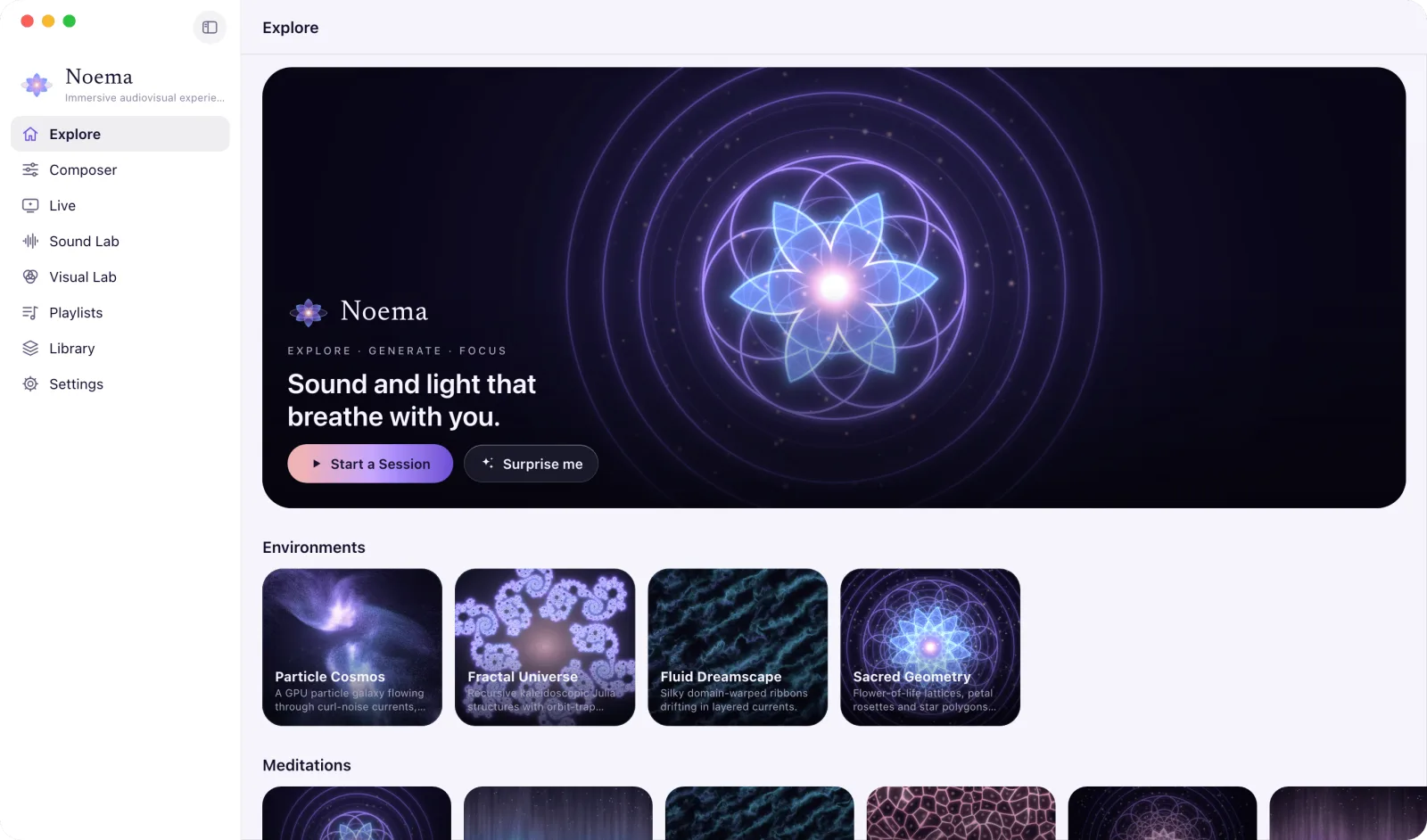
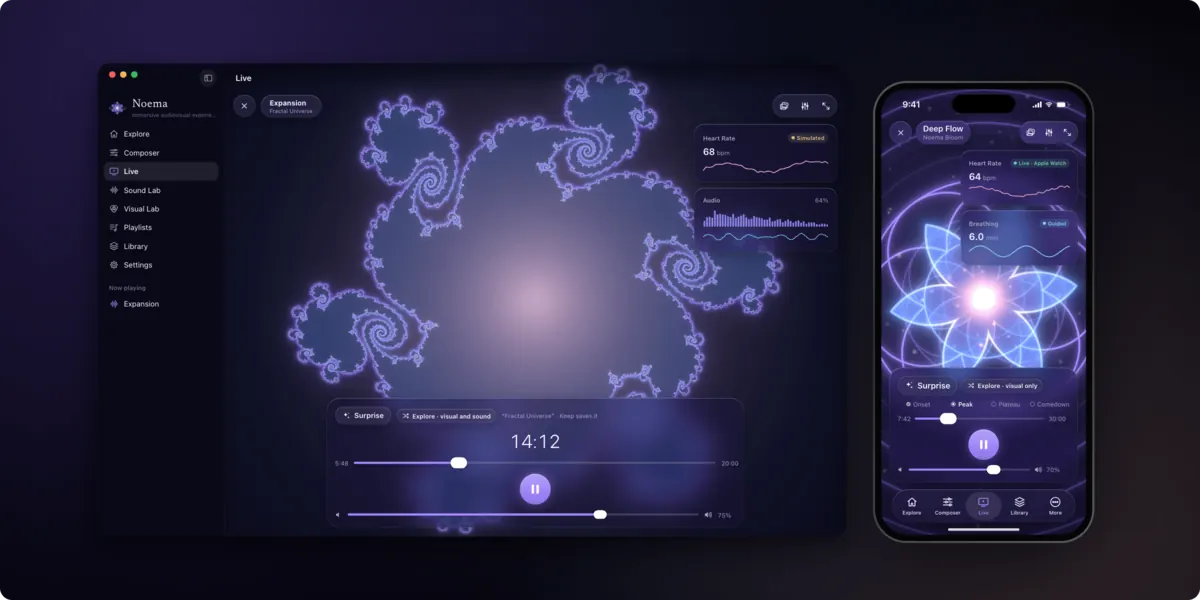
Mac Explore in the light theme, a Montage recreation. The artwork stays dark by design.
Surprise, and Keep
My favorite button. Surprise sits on Live, the Composer, Sound Lab, Visual Lab and Home, and offers Surprise session, Surprise sound or Surprise visual. In Live, the swap happens during playback with a crossfade, and Keep saves what you like. Explore goes one further and reshuffles the visual, the sound or both every 30 seconds, 1 minute or 2 minutes, scheduled on the engine's transport clock so nothing fires while you're paused.
Surprise visual during playback, then Keep: Noema Bloom dissolves into Halo Orbit over 2.5 seconds. A Montage recreation with synthetic values.
A real heartbeat, an honest simulator, files that travel
On Apple Watch, Noema reads live heart rate from a workout session you start yourself and sends it to the iPhone as a real signal. The watch also works as a now-playing remote with Crown volume, has a native Bloom visual, and can mirror the rendered visuals.
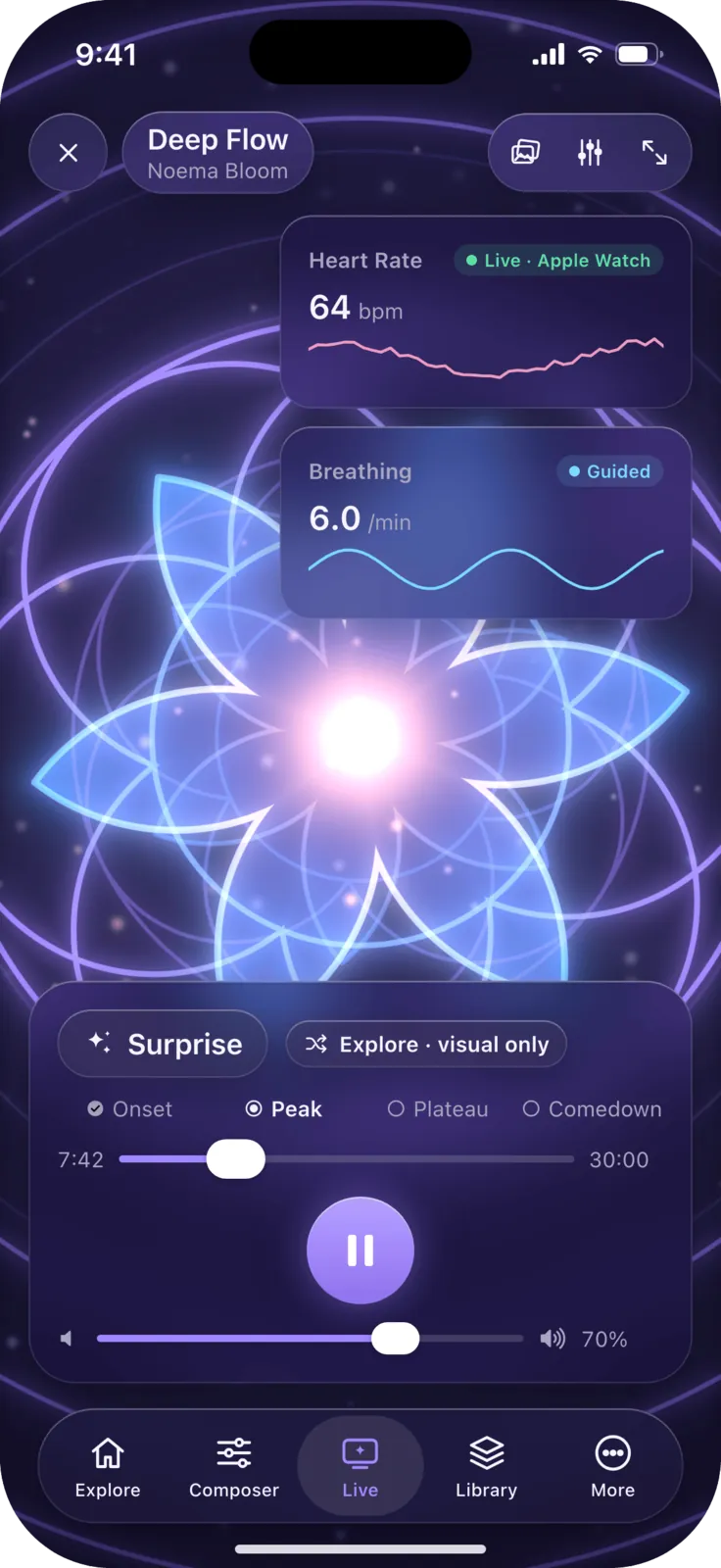
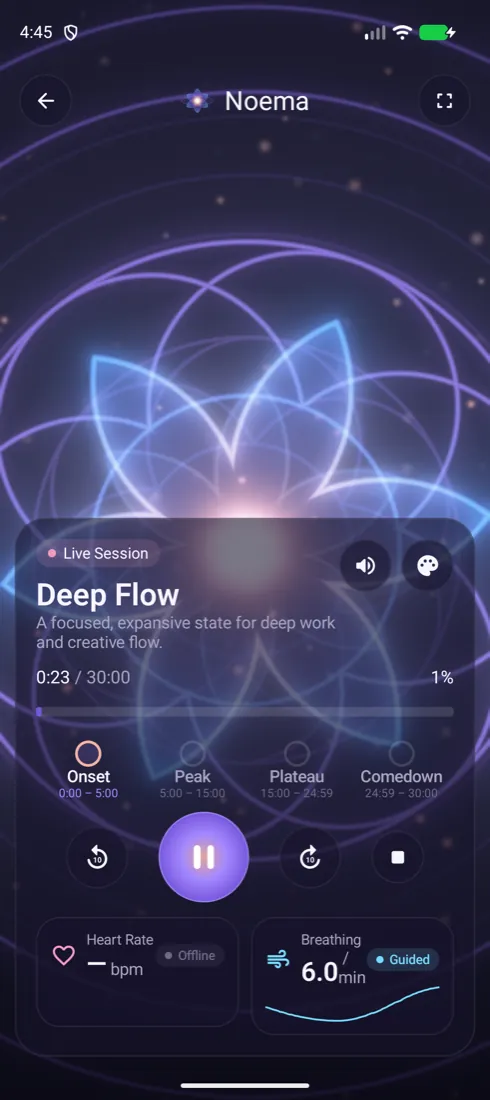
iPhone Live playing Deep Flow, a Montage recreation. The heart rate and breathing values are synthetic.
No watch? No sensor? No problem, and no pretending either. The signal simulator drives heart rate, breathing, depth, tilt and microphone level, and every simulated value is labeled Simulated on screen. That label is the "nothing is faked" rule again, applied to the one place where faking would be easiest.
And everything you make travels. Presets, experiences and playlists export to .noema files that open on every platform. Make a meditation on the Mac, open it on Android.
Try it in five moves
If you get a build in front of you, this is the tour I'd give you:
- Home › Surprise › Surprise session. A random 3-minute session starts. Move your finger or mouse over the visuals. In Live, open Surprise again to swap the sound or the visual, or turn on Explore.
- Home › Meditations › 1-Minute Reset. Breathe with the bloom.
- Settings › Signal simulator. Turn on heart rate and play Heart Coherence: the colors follow the simulated pulse. With an Apple Watch, start a session on the watch instead.
- Visual Lab › Randomize › Shapes. Then pause the animation and tweak the parameters.
- Composer. Pick a sound and a visual, turn the session arc off, choose 1 minute and save.
Under the hood
Four apps, one brain. The architecture comes down to four sentences:
- One engine everywhere. A portable C++17 DSP engine with a C API, compiled natively for Apple and Android and to WebAssembly (in an AudioWorklet) for the desktop app. Imported files and synthesized layers go through the same mix, limiter and analysis.
- One renderer everywhere. The visual engine (TypeScript, three.js 0.187 and GLSL) builds into a single self-contained WebGL2
index.htmlthat each app hosts in its web view and drives over a small bridge. - One data format. Versioned JSON schemas cover sounds, visuals, experiences, playlists and settings. The parameter and signal registries generate the editors on every platform.
- The audio clock is in charge. Phases, automation, playlist items, transitions and Explore are scheduled in transport time, not with UI timers.
Here's how a sound becomes a picture:
 synth layers ───┐
                 ├──► mix: scenes · transitions · limiter ──► audio out
 imported audio ─┘                    │
                                      ▼
                      analysis: bands · onsets · tempo ──── analysis frames ────┐
                                      │                                         ▼
 signals ─────────────────► signal and mapping engine ── visual params ──► WebGL2 renderer
   touch · motion · breathing         │                                   three.js · GLSL
   mic · Watch heart rate · simulator └── sound params ──► back into the synth layers
The native shells (SwiftUI, Compose, Electron) own the screens, the editors, the sensors and the JSON library with .noema import and export. Everything that makes sound or light is shared.
| Platform | Built with | Minimum |
|---|---|---|
| iPhone · iPad · Mac | SwiftUI (Swift 6), AVAudioEngine, WKWebView | iOS, iPadOS and macOS 26 |
| Apple Watch | SwiftUI, HealthKit workout session, WatchConnectivity | watchOS 26 |
| Android | Kotlin, Jetpack Compose (Material 3), NDK and JNI, AAudio, MediaCodec | Android 10 (API 29) |
| Windows (and macOS desktop) | Electron and React, the engine as WebAssembly in an AudioWorklet | Windows 10 or 11, x64 |
The repo is laid out the same way:
Noema/
├── schemas/    shared JSON schemas, parameter and signal registries, built-in content
├── engine/     C++17 DSP engine, C API, doctest tests and the noema-analyze and noema-render tools
├── renderer/   TypeScript and three.js visual engine → one self-contained index.html
├── apple/      SwiftUI app for iOS, iPadOS and macOS, plus the watchOS companion (XcodeGen)
├── android/    Kotlin and Compose app (NDK and JNI, AAudio)
├── desktop/    Electron app for Windows and macOS (engine as WebAssembly)
├── design/     tokens, brand mark and the six app-icon variants
├── samples/    the demo track and decoder test fixtures
└── scripts/    build, test and schema-validation scripts
Two details I like. The renderer runs deterministically with ?clock=manual, which is how frames can be rendered offline. And the Windows installer is built on macOS, no Wine involved:
scripts/build-renderer.sh   # build the visual engine into one HTML file and copy it into the Apple and Android apps
scripts/test-all.sh         # schemas, engine, renderer, Apple, Android and desktop unit tests
scripts/build-desktop.sh    # the unsigned Windows x64 installer, built on macOS without Wine
test-all.sh covers the engine (doctest, including a zero-allocation real-time test), the renderer (vitest, including 200-seed schema validation of the randomizer), Apple (Swift Testing on macOS and the iOS simulator), Android (JVM), the desktop app (vitest, including a WebAssembly engine smoke test) and schema validation of all built-in content. UI flows are tested by hand.
Real captures
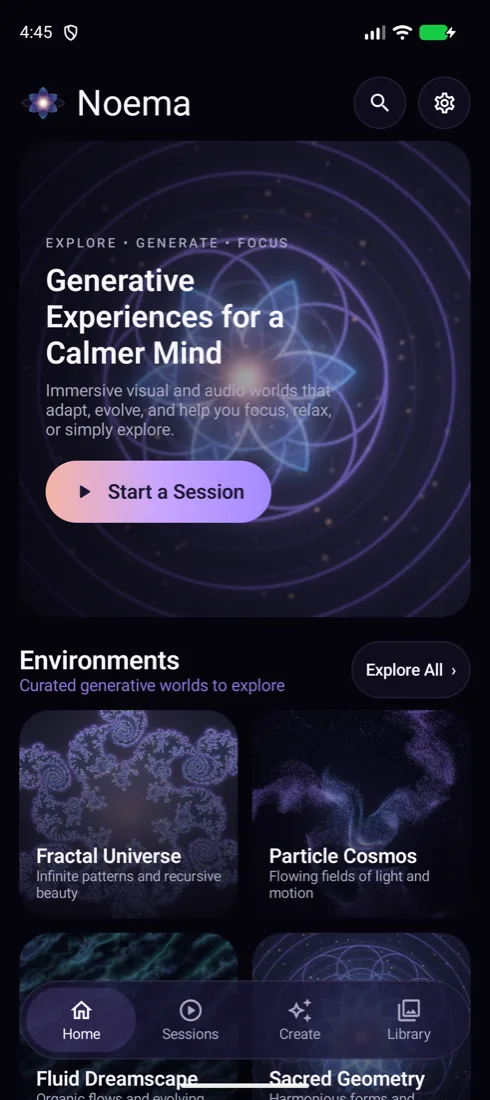
Most images above are recreations. These two aren't: they're screenshots of the running v1.0.0 app on the Android emulator.
Privacy, in five lines
- No network. The apps contain no network client and make no network requests.
- No accounts, analytics or ads. There is nothing to sign in to and nothing is tracked.
- Sensor data stays on your devices. Heart rate, motion and microphone level are used live and never sent anywhere. Heart rate travels only from your Apple Watch to Noema on your iPhone.
- Health is opt-in. A workout is saved to Apple Health only when you turn on Save to Health.
- No medical claims. Noema is an audiovisual experience, not a health or medical product. The meditations are for breathing with a bloom, not for diagnosing anything.
What's not there yet
Noema is at v1.0.1. The Apple apps run on device; Android and Windows are in testing. Here's the honest hardware table, as of the latest README:
| Surface | Status |
|---|---|
| iPhone · iPad · Mac | Runs on device (tested on iPhone 17 Pro, iPad Pro 13" and macOS) |
| Apple Watch | Built and installed on device, with the heart-rate relay to the iPhone. Remote, native Bloom and mirror bandwidth and battery are unmeasured |
| Android | Runs on the emulator (API 37). Phone testing in progress |
| Windows | Installer built on macOS. Testing on Windows in progress |
| Depth (LiDAR, ARCore) | Not built. The depth signals come only from the simulator |
| Heart rate on Wear OS | Not built. Simulator only |
A few more rough edges:
- Unsigned desktop builds. The Windows installer and the macOS desktop zip aren't signed, so SmartScreen and Gatekeeper warn the first time you open them.
- Basic editors. The lab editors are forms generated from the registries, and the tempo estimate stays low-confidence on ambient material by design.
- Number formatting. Android writes numbers as
1.0where Apple writes1and drops unknown keys, so exported documents are equal in meaning but not byte for byte.
And what's next on the roadmap:
- Device testing of the Android phone and Windows builds, and a signed desktop installer
- A horizontal playlist timeline with session-arc and automation editing
- Three-panel lab layouts with quick and advanced modes
- Real depth providers from LiDAR and ARCore
- Standalone audio on Apple Watch, and a Wear OS companion for heart rate
Noema has its own card on the projects page, with the demo loop, the explainer and the stack at a glance.
Curious about the source? It's private, but access can be granted to anyone interested in contributing. Get in touch.